MIPS and Megabytes.
You are here: Diigo Home > York > York 's lists
Tags: 5star, AI, MIPS, brain, computer, megabytes, memory, trend on 2007-09-09 and saved by5 people -All Annotations (0) -About
more fromwww.transhumanist.com


通信接口的编写应尽量
.采用中断+缓冲区,
.分层+结构化设计,
.尽量不使用轮循方式(降低AVR的效率)。参见URAT(RS232)驱动+中间层软件示例。
提高硬件可靠性的考虑:
.尽量采用片内晶体、采用低频率的系统时钟、振荡电路的输出小幅度。
.选择合适的启动延时参数
.使用BOD、片内的看门狗
.合理休眠方式的使用
.不用I/O口设定输出低电平
.利用内部的EEProm和寄存器MCUCSR判断复位标志,进行不同的处理
Tags: 5star, Logo, UCBLogo, tutorial on 2007-07-01 -All Annotations (0) -About
more fromhttp.cs.berkeley.edu
Tags: 5star, Logo, UCBLogo, book, programming, theory on 2007-07-01 -All Annotations (0) -About
more fromhttp.cs.berkeley.edu
Tags: 5star, Logo, collection, robot, toy on 2007-06-18 -All Annotations (0) -About
more fromel.media.mit.edu
Tags: 5star, Logo, Martin, embedded, handy-cricket, language, robot on 2007-06-16 -All Annotations (0) -About
more fromhandyboard.com

ab, onfor 20
There is also a free-running timer, which keeps track of elapsed
time even when the Cricket is doing other things.
global [cats dogs]
creates two globals, named cats and
dogs. Additionally, two global-setting primitives,
setcats and setdogs, are instantiated.
Tags: 5star, Martin, good-design, handy-cricket, robot on 2007-06-16 and saved by2 people -All Annotations (0) -About
more fromwww.research.ibm.com
LISP, BASIC, or FORTH.PIC assembly language and running on the Cricket, and a compiler for the virtual machine running on a desktop development computerPIC microprocessor's internal ROMEEPROMEEPROM, and for asking the virtual machine to begin execution of byte codes already loaded into the EEPROM.
The infrared protocol includes the following capabilities:
EEPROM. sensora and sensorb) return a value (0 to 255) for each of the two voltage inputs. These inputs also may be interpreted as digital values using the switcha and switchb primitives. There is a pair of primitive functions for generating tones on the piezo beeper: beep and note, the latter taking pitch and duration arguments.
Tags: 5star, collection, electronics, embedded on 2007-06-15 -All Annotations (0) -About
more fromelm-chan.org
Tags: 5star, DIY, calibration, color, light, photoresistor, project, sensor, similarity, trick, tutorial on 2008-03-29 -All Annotations (0) -About
more fromwww.societyofrobots.com


equation:
now using our numbers:
grey floor = (108 - 95)/95 * 100 = 13.7% different
white line = (108 - 112)/112 * 100= 3.6% different
compare: white line < grey floor
therefore the sensor sees a white line
if you wanted three different colors it would look something like this:


Tags: 5star, calibration, sensor on 2007-06-14 -All Annotations (0) -About
more fromwww.societyofrobots.com
There are only 3 steps you need to follow:
Tags: 5star, collection, robot, sensor on 2007-06-14 -All Annotations (0) -About
more fromwww.societyofrobots.com
Tags: 5star, Li, NiCd, NiMH, battery, rechargeable on 2007-06-18 -All Annotations (0) -About
more fromblog.21ic.com
Tags: 5star, behavior-based, comparison, control, deliberative, hybird, reactive, robot on 2007-06-07 -All Annotations (0) -About
more fromwww-robotics.usc.edu
Tags: 5star, portal, robot on 2007-05-31 and saved by3 people -All Annotations (0) -About
more fromwww.societyofrobots.com
Tags: 5star, BEAM, DIY, motor, photopopper, phototrope, photovore, robot, solderless, toturial, trick, wiring on 2007-07-22 -All Annotations (0) -About
more fromraysbeambots.solarbotics.net


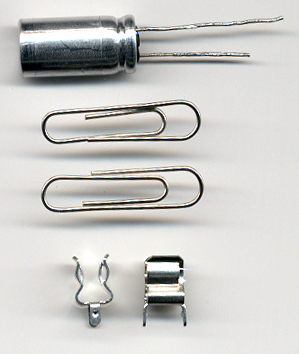
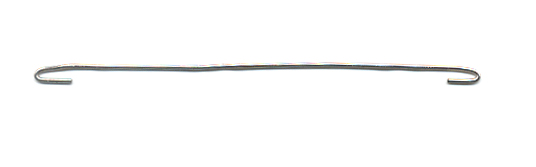
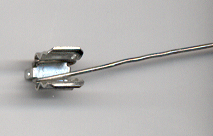
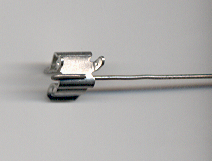
Set one straightened paper clip aside, you will use it at the
end. Bend the two tips of one of the two paper clips as shown.

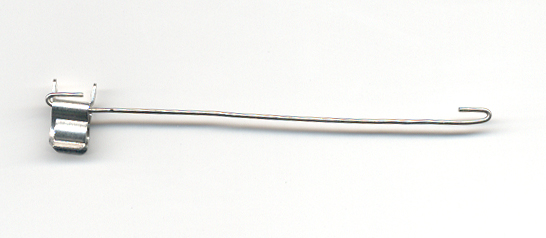
Put it in through the fuse clip like this, but make sure the
notch in the fuse clip is facing out. (The clip has one edge bent inwards. This
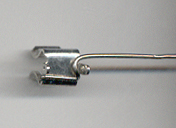
is the part that has to face outwards). Study this next picture closely.

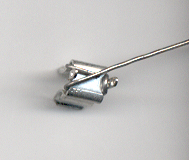
From the position above, bend the paper clip up and then
around the lead of the fuse clip as in the next picture.

Bend the paper clip under the fuse clip...

then up and over the fuse clip:

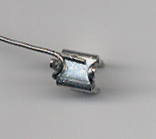
then around its other lead and you're almost done with the
first fuse clip.

First clip -- wire is on the RIGHT side of the fuse clip
leads...

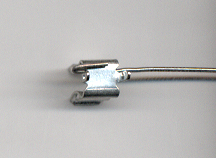
Second Clip -- wire is on the LEFT side of the fuse clip
leads... But remember to make sure the notch in the fuse clip is facing out.
(The clip has one edge bent inwards. This is the part that has to face
outwards).

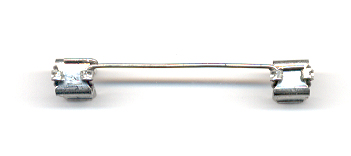
Follow all the steps above with the second clip and you get
this:

Tags: 5star, BEAM, circuit, solar on 2007-05-28 -All Annotations (1) -About
more fromlibrary.solarbotics.net