
This link has been bookmarked by 217 people . It was first bookmarked on 21 Mar 2008, by Jim Newbold.
-
03 Jun 16
-
22 May 16
-
it’s pretty amazing
-
-
18 Dec 15
-
09 Nov 15
-
11 Aug 15
-
In order to address some of the sources of CPU overhead and provide developers with more explicit control over rendering, we’ve been working to bring a new 3D rendering API, Vulkan™, to Android.
-
-
27 Jul 15
-
09 Jul 15
-
20 Jun 15
-
11 May 15
-
01 Apr 15

-
- Manage their business to revenue targets
- Identify hot spots in their business metrics so they can continuously focus on the game updates that will drive the most impact
- Use analytics to understand how players are progressing, spending, and churning
Analytics is a key component of running a game as a service, which is increasingly becoming a necessity for running a successful mobile gaming business. When you take a closer look at large developers that do this successfully, you find that they do three things really well:
-
-
17 Mar 15
-
03 Mar 15
-
11 Jan 15
-
01 Jan 15
-
01 Dec 14
-
27 Oct 14
-
03 Oct 14
-
Android One: Bringing Your Apps to the Next Five Billion
Posted by Rich Hyndman, Developer Advocate
With the launch of Android One, more people across the world will have access to high-quality and affordable smartphones, packed with plenty of processing power and running the latest version of Android. These devices are available now in India and soon in Indonesia, the Philippines, and South Asia, so now is a good time to make sure your apps are ready for these new markets. This post highlights a few areas to consider.
These days, we often talk about smooth, 60fps transitions and keeping apps jank-free, and rightly so — performance is a critical metric for app quality. But in the user experience hierarchy of needs, an app should first and foremost do its job reliably and consistently.
If your app has search functionality, will user requests time out entirely? Do you think it is more important that a result is returned in a timely manner, or that the result is returned at all? If you're trying to build a robust app to reach the next five billion, it might be less about returning a result immediately, and more about returning a result at all. To address this challenge, why not include an option to users to “notify me with the results” when a search query is running on a slow network? Your app can then take as long as it needs to successfully retrieve the data in the background and show a notification when complete. The difference in user experience between an app that times out on a slower network and one that caters to user-specific needs will be very impactful for driving mobile app adoption.
There are also w
-
ays to test app performance without flying around the globe. The Android Emulator has network speed and network delay emulation settings, which can become an integral part of your testing strategy. If you’re testing on physical hardware, try turning off WiFi and switching the network to 2G only; how well does your app perform? Do search pages load? Does data refresh? These issues can often be fixed with relatively minor changes to your app logic or by leveraging a SyncAdapter. Check out our blog post on sync in the Google I/O app for more ideas.

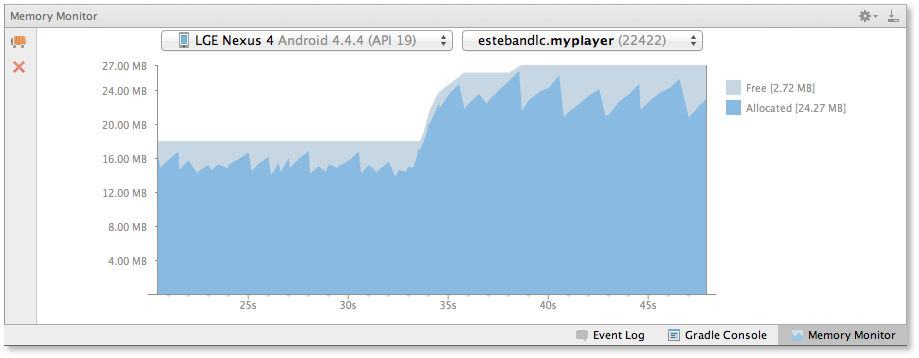
Another key area for you to be aware of is app memory utilization. As part of the KitKat launch, we added new tools to the SDK for analyzing memory use and new APIs like isLowRamDevice(). We also just added a Memory Monitor to Android Studio 0.8.10 (currently in Canary). Much of this is documented in our Best Practices for Performance guide.
Moving forward, the Android L release has a strong focus on battery usage and analysis. Project Volta introduces new tools, such as Battery Historian and new APIs like JobScheduler, that can really help optimize battery use of your app.
By ensuring your app works well on slower networks, uses minimal memory, minimizes battery usage and doesn’t have a larger-than-necessary APK, you will help the next five billion discover, use and love your app.
Labels: Android, Android One -
25 August 2014
Powerful New Messaging Features with GCM
By Subir Jhanb, Google Cloud Messaging team
Developers from all segments are increasingly relying on Google Cloud Messaging (GCM) to handle their messaging needs and make sure that their apps stay battery-friendly. GCM has been experiencing incredible momentum, with more than 100,000 apps registered, 700,000 QPS, and 300% QPS growth over the past year.
At Google I/O we announced the general availability of several GCM capabilities, including the GCM Cloud Connection Server, User Notifications, and a new API called Delivery Receipt. This post highlights the new features and how you can use them in your apps. You can watch these and other GCM announcements at our I/O presentation.
Two-way XMPP messaging with Cloud Connection Server
-
XMPP-based Cloud Connection Server (CCS) provides a persistent, asynchronous, bidirectional connection to Google servers. You can use the connection to send and receive messages between your server and your users' GCM-connected devices. Apps can now send upstream messages using CCS, without needing to manage network connections. This helps keep battery and data usage to a minimum. You can establish up to 100 XMPP connections and have up to 100 outstanding messages per connection. CCS is available for both Android and Chrome.
User notifications managed across multiple devices
Nowadays users have multiple devices and hence receive notifications multiple times. This can reduce notifications from being a useful feature to being an annoyance. Thankfully, the GCM User Notifications API provides a convenient way to reach all devices for a user and help you synchronise notifications including dismissals - when the user dismisses a notification on one device, the notification disappears automatically from all the other devices. User Notifications is available on both HTTP and XMPP.
Insight into message status through delivery receipts
When sending messages to a device, a common request from developers is to get more insight on the state of the message and to know if it was delivered. This is now available using CCS with the new Delivery Receipt API. A receipt is sent as soon as the message is sent to the endpoint, and you can also use upstream for app level delivery receipt.
How to get started
If you’re already using GCM, you can take advantage of these new features right away. If you haven't used GCM yet, you’ll be surprised at how easy it is to set up — get started today! And remember, GCM is completely free no matter how big your messaging needs are.
To learn more about GCM and its new features — CCS, user notifications, and Delivery Receipt — take a look at the I/O Bytes video below and read our developer documentation.
-
-
05 Sep 14
-
04 Sep 14
-
30 Aug 14
-
06 Aug 14
-
04 Aug 14
-
09 Jul 14
-
 berephon
Android Developers Blog website. Cleaner that Ars Technica, but boring.
-
02 Apr 14
-
01 Apr 14
-
03 Mar 14
-
06 Feb 14
-
Google Cast SDK
The Google Cast SDK makes it easy to bring your content to the TV. There’s no need to create a new app — just incorporate the SDK into your existing mobile and web apps. You are in control of how and when you publish your Google Cast-ready app to users through the Google Cast developer console. Find out more by reading Ready to Cast on the Google Developers Blog
-
-
04 Feb 14

-
27 Jan 14
-
22 Jan 14
-
08 Jan 14
-
07 Jan 14
-
25 Nov 13
-
02 Nov 13
-
14 Oct 13

-
02 Oct 13
-
07 Sep 13
-
13 Aug 13
-
04 Mar 13
-
17 Jan 13
-
19 Jul 12
-
25 Jun 12
-
27 May 12
-
22 May 12
-
12 Feb 12
-
07 Jan 12
-
27 Oct 11
-
08 Oct 11
 yuval yehiam
Do’s and Dont’s
Your graphic is not an ad, it’s a teaser. It’s a place for bold, creative promotional images.
Vivid background colors work best. Black and white are problems because those are the backgrounds used by the mobile-device and Web versions of Android Market.
Limit Text to your app name and maybe a few additional descriptive words. Anything else will be unreadable on phones, anyhow. -
28 Sep 11
-
27 Sep 11
-
19 Sep 11
-
29 Jul 11
-
22 Jul 11
-
21 Jul 11
-
11 May 11

-
04 May 11
-
27 Mar 11
-
25 Feb 11
-
18 Feb 11
-
24 Jan 11
 keenhenry1109
Android Developers Blog - Good reference for your android apps development.
android google development mobile programming blog java developers forum reference
-
29 Dec 10
-
18 Nov 10
-
01 Oct 10
-
21 Sep 10
-
14 Sep 10
-
18 Aug 10
-
25 Jun 10
-
23 Jun 10
-
HeightMapProfiler. This is a simple 3D benchmarking tool that I wrote. It is the source of the performance numbers in this post. You can also use it to test how various GL state affects performance on your device (texture size, texture filtering, mip-mapping, etc).
SpriteMethodTest. Another simple benchmarking tool, this one for sprite drawing. This code is also useful as a 2D game skeleton application.
GLSurfaceView. This is a Java class that makes it trivial to set up an OpenGL ES application. You can use this code in combination with the NDK or with Java alone.
Quake Port. The complete source for an Android port of Quake has been made available by Jack Palevich, an Android team engineer. It’s a great sample of how to mix Java and native code, how to download textures to the sdcard over HTTP, and all kinds of other cool stuff (check out his memory-mapped-to-sdcard texture manager).
Replica Island. Here’s the complete source to my game, released under Apache2. Use it as a reference, or to make your own games.
The rest is up to you. But before you go, here are a few resources that might come in handy:
-
-
11 Jun 10
-
26 May 10
-
24 May 10
 nemono
For example, the Twitter for Android application that we worked with Twitter to design gives you, the 3rd party developer, a working example of how you can customize and build an application that’s both fun and highly functional. This blog post is meant t
-
19 May 10
-
14 May 10
-
23 Feb 10
-
10 Feb 10
-
17 Dec 09
-
09 Dec 09

-
03 Dec 09
-
27 Oct 09
-
18 Oct 09
 Jonathan Engelsma
"To date, all Android devices (such as the T-Mobile G1 and Samsung I7500, among others) have had HVGA (320x480) screens. The essential change in Android 1.6 is that we've expanded support to include three different classes of screen sizes:
* small: devices with a screen size smaller than the T-Mobile G1 or Samsung I7500, for example the recently announced HTC Tattoo
* normal: devices with a screen size roughly the same as the G1 or I7500.
* large: devices with a screen size larger than the G1 or I7500 (such as a tablet-style device.)
" -
16 Sep 09
-
07 Sep 09
-
12 Aug 09
-
12 Jul 09
-
25 Jun 09
-
03 Jun 09
-
28 Apr 09
 Ivan Rivera
Blog para desarrolladores de Android
** software tools programming development android developer platform api gphone opensource
-
 riveraivan
Blog para desarrolladores de Android
** software tools programming development android developer platform api gphone opensource
-
24 Apr 09
-
17 Apr 09
-
22 Mar 09
-
24 Jan 09
-
09 Jan 09
-
21 Dec 08




Would you like to comment?
Join Diigo for a free account, or sign in if you are already a member.