
  • CSS How to

    • <head>
      <link rel="stylesheet" type="text/css"
      href="http://www.w3schools.com/mystyle.css" />
      </head>
    • <head>
      <style type="text/css">
      hr {color: sienna}
      p {margin-left: 20px}
      body {background-image: url("images/back40.gif")}
      </style>
      </head>
    • 2 more annotations...
  • CSS Introduction

      • What is CSS?


        • CSS stands for Cascading Style Sheets
        • Styles define how to display HTML elements
        • Styles are normally stored in Style Sheets
        • Styles were added to HTML 4.0 to solve a problem
        • External Style Sheets can save you a lot of work
        • External Style Sheets are stored in CSS files
        • Multiple style definitions will cascade into one
      • Cascading Order


        What style will be used when there is more than one style specified for
        an HTML element?


        Generally speaking we can say that all the styles will "cascade" into
        a new "virtual" style sheet by the following rules, where number four
        has the highest priority:


        1. Browser default
        2. External style sheet
        3. Internal style sheet (inside the <head> tag)
        4. Inline style (inside an HTML element)


        So, an inline style (inside an HTML element) has the highest priority, which
        means that it will override a style declared inside the <head> tag, in
        an external style sheet, or in a browser (a default value).
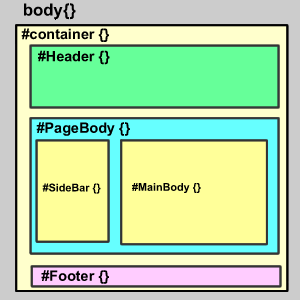
  • Div+CSS布局入门教程 - 蓝色理想

    www.blueidea.com/...3574_3.asp - Preview

    css on 2007-10-09 and saved by 2 people

    • 因为GIF格式的图片文件更小,这样能使页面载入的速度更快,当然使用此格式之前必须确定图片并没有使用太多的颜色,当我们使用了GIF格式时,从肉眼上并不能看出图片有什么太大的变化,因此这是可行的。
    • * 接下来的Banner部分还能使用GIF格式吗?
      答案是不能,因为Banner部分是一个细致的图片,如果使用GIF格式颜色会有太大的损失,所以必须使用JPEG格式,将文件导出为banner.jpg。
  • Div+CSS布局入门教程 - 蓝色理想

    www.blueidea.com/...3574_2.asp - Preview

    css on 2007-10-09 and saved by 2 people

    • 顺序是 上 / 右 / 下 / 左,你也可以书写为margin:0(缩写);
    • margin:0px auto;
      说明上下边距为0px,左右为自动调整;
    • 1 more annotations...
  • 用CSS设置网页格式

    cache.baidu.com/c - Preview

    css on 2007-10-16

    • Border-left-width、border-right-width、border-top-width和border-bottom-width属性


      这四个属性分别用于设置左、右、上、下四周边框的宽度,其取值可以是thin、medium、thick和length。其中length是可以使用的长度单位数值,默认值为medium,且不能取值。

    • Border-style 属性


      该属性用于设置边框的的样式,取值可以是none、dotted、dashed、solid、double,groove,ridge,inset,outset。其中,none为默认值,表示无边框;

    • 11 more annotations...
  • CSS盒模型--HTML

    • 平面示意图


  • CSS Pseudo-classes

    • selector:pseudo-class {property: value}
    • selector.class:pseudo-class {property: value}
    • 1 more annotations...
  • CSS Dimension Properties

    • The CSS dimension properties allow you to control the height and width of an
      element. It also allows you to increase the space between two lines.
1 - 12 of 12
Showing 20 items per page
List Comments (0)