
This link has been bookmarked by 42 people . It was first bookmarked on 25 Jul 2006, by acheng.
-
11 Jul 10
 Barbara Grabowski
This is a place to get help with bookmarking using Diigo! It is very helpful.
-
20 Feb 09

-
29 Jan 09
-
Archive your bookmarked pages to insure they are always available as originally seen, i.e. never have to worry about link rot again (currently only html pages are archived).
-
-
24 Jan 08
-
bookmarking
-
- bookmarks online and access them from anywhere, using any browser.
- Tags and full-text search on everything make it extremely easy to organize and find stuff - no need to fumble with folders and subfolders.
- Archive your bookmarked pages to insure they are always available
-
-
16 Jan 08
-
Bookmarking Basics
-
-
18 Nov 07
-
01 Nov 07
-
29 Oct 07
-
06 Oct 07
-
12 Sep 07
-
- Keep all your bookmarks online and access them from anywhere, using any browser.
- Tags and full-text search on everything make it extremely easy to organize and find stuff - no need to fumble with folders and subfolders.
- Archive your bookmarked pages to insure they are always available as originally seen, i.e. never have to worry about link rot again (currently only html pages are archived).
- Control the privacy setting on what can be seen by public or kept private.
To get started, you need to install
-
-
17 Jun 07
-
24 May 07
-
Archive your bookmarked pages to insure they are always available as originally seen, i.e. never have to worry about link rot again (currently
-
-
07 Apr 07
-
- Keep all your bookmarks online and access them from anywhere, using any browser.
- Tags and full-text search on everything make it extremely easy to organize and find stuff - no need to fumble with folders and subfolders.
- Archive your bookmarked pages to insure they are always available as originally seen, i.e. never have to worry about link rot again (currently only html pages are archived).
- Control the privacy setting on what can be seen by public or kept private.
- The URL and Title of the web page should appear automatically, but can be revised if desired.
- Type descriptive tags for the site using any numbers of tags, separated by space.
- Bookmarks may be made Public or Private using the Privacy drop-down menu. See Options for more details.
- Checking the "Unread" box will make the bookmark appear in boldface on your Diigo page. You can sort by "Unread" for easy access. See Options for more details.
Bookmarking Basics
Diigo's advanced online bookmarking system lets you:
To get started, you need to install the Diigo Toolbar or add the Diigolet to your browser. The instructions below assume you have installed the Diigo toolbar.
When you are visiting a webpage you wish to bookmark, just click the "Diigo" button on the toolbar or through your right-click menu via your mouse, the Diigo dialog box will pop up, giving you the option of entering or editing details about the webapge:
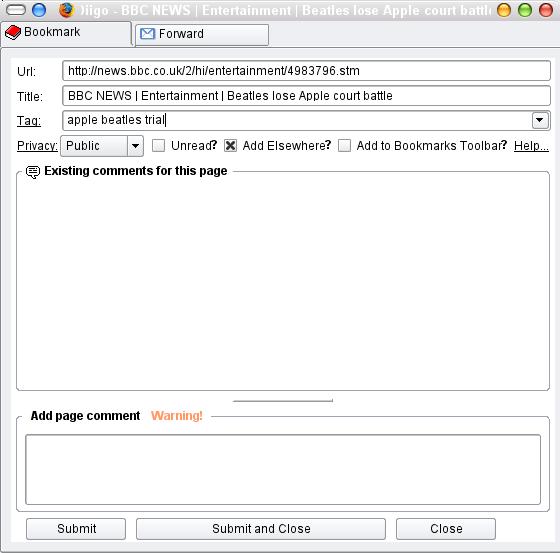
Click "SUBMIT AND CLOSE" button when you're done, and the website will be bookmarked to your Diigo account, and archiving will happen typically within a few minutes (it may take longer sometimes)
-
-
02 Apr 07
-
When you are visiting a webpage you wish to bookmark, just click the "Diigo" button on the toolbar or through your right-click menu via your mouse, the Diigo dialog box will pop up, giving you the option of entering or editing details about the webapge:
-
-
14 Feb 07
-
28 Nov 06
-
Bookmarking Basics
-
-
01 Aug 06


Page Comments
Would you like to comment?
Join Diigo for a free account, or sign in if you are already a member.