


LINKROLL Definition: A list of recently-bookmarked links with brief descriptions, in the sidebar of a blog. ( -TFD.com)
http://encyclopedia.TFD.com/List+of+blogging+terms
This link has been bookmarked by 7 people . It was first bookmarked on 29 Jul 2006, by Moultrie Creek.
-
13 Apr 11
-
11 Feb 11
-
Add Sticky NoteLinkrolls
-
-
-
28 Sep 07
-
25 Sep 07
-
07 Apr 07
-
Enhanced Linkrolls
Diigo provides several ways to connect your social annotation to your blogging experience. Both Diigo's "Enhanced Linkrolls" and "Blog-This" offer very unique blog-integration features unlike any other services out there!
Like other Linkrolls, Diigo's Enhanced Linkrolls let you have your latest Diigo bookmarks displayed as a part of your site. But that's not all. Enhanced Linkrolls let you share your annotated webpages with the world, so that your site readers can click and view your latest annotated webpages along with your public highlights / sticky notes.
So with minimal effort, you literally have an instant collaborative platform right on your site that lets you share your two cents on any webpage, and further invite discussions from you site visitors, all perfectly within context.
In addition, you also have the option of retrieving and displaying only bookmarks with a certain tag (or tag combination such as "tag1+tag2"). This is very helpful when your site caters to a specific topic. You can also create multiple linkrolls according to your need.
To generate the script for Diigo's Enhanced Linkrolls, go to linkrolls, select the display options. Once the script is generated, copy and paste it into your site's source code.
Diigo Enhanced Linkrolls
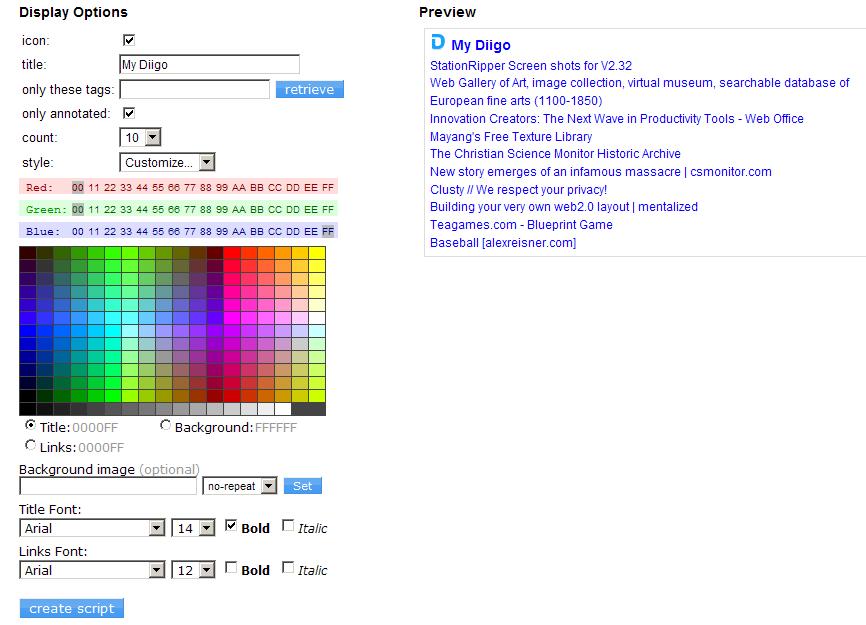
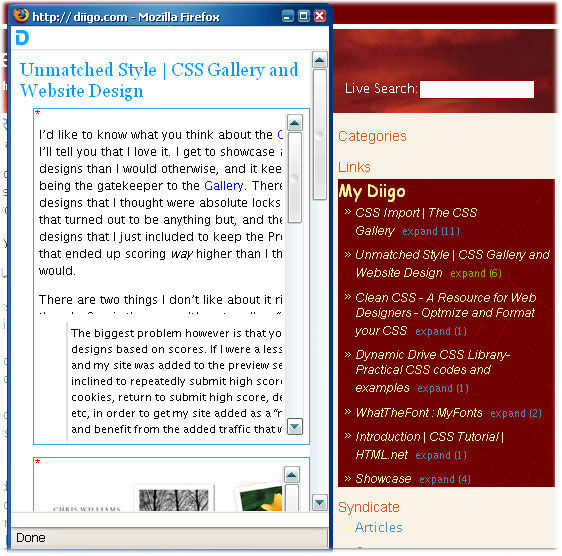
Icon: display Diigo icon on top Title: enter text you wish to display Only these tags: retrieve your tag-specific public bookmarks. Combination tags allowed (such as, tag1+tag2) Only annotated: retrieve only your bookmarks with your highlights. Any public sticky notes / page comments will also be displayed in a small pop-up window when expanded. Of course, when others click into any of your bookmark link, the original webpage will be fully displayed along with any Diigo public annotations. Count: display how many bookmark links at once Style: Standard (blue font), Simple (black font), Customize (see below) Customize: we offer a full array of styling options. For example, select Title, then pick a color by pointing to a color desired. Then select Links to pick their color, etc. After finishing all selections, then click "CREATE SCRIPT". Here is what it looks like once the codes are copied to your site's sidebar. Notice that any bookmark marked with your highlights, sticky notes, and comments will have an "EXPAND" link next to it. Click "EXPAND", all the public annotations on that webpage will show up in a small pop-up window.
Note: if there are public annotations made by other Diigo users, one can also click on their username and go visit their Diigo page. This is a great way to facilitate further information exchange for those commented on the very same webpage and easily let you and your readers identify those who share common interests!
-


Public Stiky Notes
http://encyclopedia.TFD.com/List+of+blogging+terms
Would you like to comment?
Join Diigo for a free account, or sign in if you are already a member.