
fjh

babar babar's List: Testlist
-
<dl><p><a href="http://googlenotebookblog.blogspot.com/" class="eTitle" rel="nofollow">Official Google Notebook Blog</a><p>show bookmarks bar."\n\n\n\nThen, go to the bookmarklet page and drag and drop the bookmarklet on to your bookmarks bar.\n\nThe next time you find something you want to clip, click on "Note This" in your bookmarks bar and away you go. Hurrah!</p></p><div><ul class="eAUL"><li style="line-height:150%;margin-bottom:.6em;"><div class="eHContent">I love my Google Notebook <a href="http://www.google.com/notebook/download" rel="nofollow">browser extension</a>. It's like a faithful puppy. It follows me by my side everywhere I go on the Internet.<br><br><img src="http://bp0.blogger.com/_XX6h9coROMk/SHaR8r0WpeI/AAAAAAAAAQs/N3dzOkyj_Tc/s400/ccmb83m6_30fsp3rmc7_b.png" id="BLOGGER_PHOTO_ID_5221521289723160034" border="0" alt="" style="cursor:pointer; cursor:hand;"><br><br>Sadly, I can't always take my Firefox extensions with me. Maybe I'm traveling, using a friend's computer, or perhaps I feel like using <a href="http://www.apple.com/safari/" rel="nofollow">Safari</a> today. Then I find a hilarious picture of a <a href="http://www.ihasahotdog.com/" rel="nofollow">LOLdog</a>. ZOMG! How do I clip it to Notebook???</div><ul class="eSUL" style="line-height:150%;margin-bottom:.6em;"></ul></li><li style="line-height:150%;margin-bottom:.6em;"><div class="eHContent"><a href="http://bp2.blogger.com/_XX6h9coROMk/SFv4YO1tg9I/AAAAAAAAAPs/wxAM-26ft7k/s1600-h/eggrecipe" rel="nofollow"><img src="http://bp2.blogger.com/_XX6h9coROMk/SFv4YO1tg9I/AAAAAAAAAPs/wxAM-26ft7k/s400/eggrecipe" id="BLOGGER_PHOTO_ID_5214034088795407314" border="0" alt="" style="cursor:pointer; cursor:hand;"></a><br><br>To change the size</div><ul class="eSUL" style="line-height:150%;margin-bottom:.6em;"></ul></li><li style="line-height:150%;margin-bottom:.6em;"><div class="eHContent"><a href="http://bp1.blogger.com/_XX6h9coROMk/SFv4QMO0L_I/AAAAAAAAAPk/nfvTSYOcI88/s1600-h/resize" rel="nofollow"><img src="http://bp1.blogger.com/_XX6h9coROMk/SFv4QMO0L_I/AAAAAAAAAPk/nfvTSYOcI88/s400/resize" id="BLOGGER_PHOTO_ID_5214033950656442354" border="0" alt="" style="cursor:pointer; cursor:hand;"></a><br><br><br>Of course,</div><ul class="eSUL" style="line-height:150%;margin-bottom:.6em;"><li><span class="eSContent">fjh<br></span><span class="eSTail" style="font-size:11px;color:#aaa;"> comment by <a href="http://www.diigo.com/user/babarbabar">babarbabar</a></span></li></ul></li></ul></div></dl>
-
Jan 16, 09
show bookmarks bar."
Then, go to the bookmarklet page and drag and drop the bookmarklet on to your bookmarks bar.
The next time you find something you want to clip, click on "Note This" in your bookmarks bar and away you go. Hurrah!-
I love my Google Notebook browser extension. It's like a faithful puppy. It follows me by my side everywhere I go on the Internet.
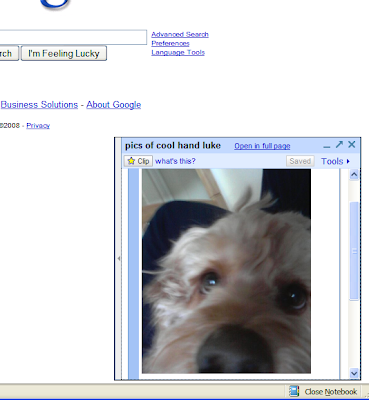
Sadly, I can't always take my Firefox extensions with me. Maybe I'm traveling, using a friend's computer, or perhaps I feel like using Safari today. Then I find a hilarious picture of a LOLdog. ZOMG! How do I clip it to Notebook??? -
To change the size
-
-
-
 I have been using Google Notebook for
-

1 - 3 of 3
20 items/page
List Comments
(0)
List Info

3 items | 9 visits