Diigo V3 Reviews
Web Address: http://www.diigo.com/list/maggie_diigo/diigo-v3-reviewsYou are here: Diigo Home > Maggie Tsai > Maggie Tsai's lists
Items:111 | Visits:407
Category:Computers & Internet | Tags:diigo, review
Created:on 2008-04-04 | Updated:about 20 hours ago
Reviews on Diigo 3.0
-
17Expand
Emily Chang - eHub: Diigo V3 a Win with Non-Intrusive Social Networking
Tags: diigo, review, v3 on 2008-04-04 and saved by15 people -All Annotations (0) -About
more fromwww.emilychang.com
-
While it seems like everyone is getting into social networking these days, most are building communities around who knows who. Diigo, leveraging its success as a knowledge sharing tool, is building communities around who knows what.
-
So much has Diigo focused on improving the social lives of Diigo users everywhere, that they’re even given a name to the concept: Social Information Networking.
-
Social Information Networking has to do with creating your social network around knowledge. It’s the ability to create a social network “with varying degrees of non-intrusiveness” around varying types and collections of knowledge
-
As a knowledge worker, I want to be able to focus on the task at hand, yet I need to be able to quickly plumb the expertise of others. The redesigned browser toolbar is a well thought-out answer to this need
-
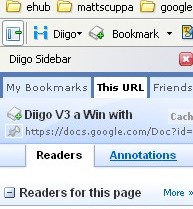
But Diigo’s new sidebar packs a lot of useful information that follows you from site to site. There’s a tab for your recent bookmarks, a tab that shows the status of your Diigo friends, and a tab that shows you who else has bookmarked the page or the site, including any annotations that have been left on the page by other Diigo users. This is huge! It means instant access to people with whom you have this page in common.
-
And then it dawns on me-- OMG! I’m being social!
-
Diigo also has some really cool ways of creating communities around knowledge items. I can join a community around a specific tag, such as ”lifehacks” or a community that has developed around a specific web site, like eHub. Or I can create a community (which Diigo calls a group) around a topic of my choosing.
-
Diigo’s new sidebar is well designed. It allows me to focus on my work while, at the same time, giving me access to Diigo’s knowledge community. Improvements to Diigo Groups has turned this aspect of the Diigo community into a powerful way to distribute and refine knowledge among a team. And Diigo’s “varying degrees of non-intrusiveness” approach to social networking has infused a level of maturity into the social networking world that has been sorely lacking up to this point. There’s a lot of hype around Diigo right now, and the bottom line is that it’s well-deserved.
-
Now, with the newly released Diigo V3, Diigo comes bounding into the social networking world. While it seems like everyone is getting into social networking these days, most are building communities around who knows who. Diigo, leveraging its success as a knowledge sharing tool, is building communities around who knows what.
-
Since that time, there has been a continuous stream of enhancements, many in response to their very active user forum. The new V3 really opens the flood gates with over a hundred new features, most revolving around a much more social Diigo. So much has Diigo focused on improving the social lives of Diigo users everywhere, that they’re even given a name to the concept: Social Information Networking.
-
Social Information Networking has to do with creating your social network around knowledge. It’s the ability to create a social network “with varying degrees of non-intrusiveness” around varying types and collections of knowledge. For those of us suffering from Facebook-fatigue, this is a refreshing diversion from the broader social networking scene. In terms of features, this translates into options. Lots of options.
-
I really latched on to Diigo’s theme of “varying degrees of non-intrusiveness”. As a knowledge worker, I want to be able to focus on the task at hand, yet I need to be able to quickly plumb the expertise of others. The redesigned browser toolbar is a well thought-out answer to this need.
-

-
I still think that the toolbar is one of the best blogging tools out there, but since I’ve begun utilizing the new sidebar, I’ve found myself back at Diigo.com more and more. I’m finding myself looking at who else has bookmarked this page, scrolling through other people’s bookmarks, people who I’ve noticed share similar interests. Then I’ll look through their tags, because maybe they’ve collected some body of knowledge about some other thing. And then it dawns on me-- OMG! I’m being social!
-
It comes back to that “varying degrees of non-intrusiveness” thinking again. I’ve got lots of options when it comes to interacting with another Diigo user. I can page through their bookmarks or check out a specific tag they’ve used. I can choose to follow them so I’ll always know if they’ve found a new lifehacks website or climate change blog. Or I can invite them to be one of my Diigo friends.
-
Diigo also has some really cool ways of creating communities around knowledge items. I can join a community around a specific tag, such as ”lifehacks” or a community that has developed around a specific web site, like eHub. Or I can create a community (which Diigo calls a group) around a topic of my choosing. Groups are very powerful knowledge devices. These are semi-autonomous knowledge sharing communities that let your explore the web together through annotations and bookmarks, and then give you the ability to rate bookmarks, pushing the most relevant items to the top. This is a great model for quickly disseminating and distilling knowledge among a team of researchers.
-
In summary, Diigo’s new sidebar is well designed. It allows me to focus on my work while, at the same time, giving me access to Diigo’s knowledge community. Improvements to Diigo Groups has turned this aspect of the Diigo community into a powerful way to distribute and refine knowledge among a team. And Diigo’s “varying degrees of non-intrusiveness” approach to social networking has infused a level of maturity into the social networking world that has been sorely lacking up to this point. There’s a lot of hype around Diigo right now, and the bottom line is that it’s well-deserved.
-
-
4Expand
Diigo 3.0: The all-powerful personal and social bookmarking service | Webware : Cool Web apps for everyone
Tags: diigo, review, v3 on 2008-04-04 and saved by10 people -All Annotations (2) -About
more fromwww.webware.com
-
There's also a very nice new browser sidebar that shows you a lot of useful and focused information, including your own latest bookmarks, those from your Diigo friends, and most cleverly, the Diigo users who have also saved information from the page you're visiting as well as the site itself.
The service finds people who bookmark like you do.
Diigo takes all the data it collects from users and lets them rotate it in interesting ways. When you're looking at the page for a site, for example, you can easily see what other users who bookmarked that site also bookmarked (sort of like MyBlogLog, Medium, eSnips). The system will suggest other sites, based on the tag cloud for a site as well as the affinity you have with its other bookmarkers, that it thinks you might like (see also: Twine). There's also a social angle: The system suggests people that it thinks you'll find interesting, by identifying the ones closest to you in bookmarking behavior. -
I was impressed by the preview I got in September of the bookmarking and Web annotation tool Diigo 3.0. It's taken the company until this morning to release this version to the public. In the interim the team has added features and tweaked the design. It's been worth the wait. This is a powerful and deep tool for serious Web users.
-
There's also a very nice new browser sidebar that shows you a lot of useful and focused information, including your own latest bookmarks, those from your Diigo friends, and most cleverly, the Diigo users who have also saved information from the page you're visiting as well as the site itself.
-

-
-
4Expand
Solving the bookmarking headache « The Guidewire
Tags: diigo, review, v3 on 2008-04-04 and saved by9 people -All Annotations (0) -About
more fromguidewiregroup.wordpress.com
-
To label it as a simple bookmark service would be unfair; it’s much more than that and could very well emerge as an oft-used research tool in my browser
-
Though initially overwhelming, Diigo has been made as user friendly as possible by its developers. The multitude of features could easily kludge up a site but the Diigo team has made quick work of them. It’s design and UI are top-notch - so much so that I recommended Diigo to another company as an excellent example of creating elegance out of chaos.
-
What I find most interesting about Diigo is precisely what turns some off: the scope. This is one of the most full-featured and in-depth Web 2.0 products I’ve seen in a long time. Rather than focus on one headache of the social Web, the company is aiming to solve seemingly all of them.
-
When it comes to this space though - the collecting of online content for future use - I think some aggregation is overdue. The myriad services dedicated to this purpose all have their upsides, but in general only end up adding to the noise. If I can depend on one site for all my bookmarking and clipping needs, that will significantly reduce the clutter in my tool bar. From my experience so far, it’s looking like that site will be Diigo.
-
-
3Expand
Diigo : The End Of Bookmarks?
Tags: diigo, review, v3 on 2008-04-04 and saved by35 people -All Annotations (2) -About
more fromwww.searchenginejournal.com
-
Whether Web 2.0 actually ever existed is irrelevant, but the innovation brought to us these last two years is undeniable. The big question for me has been:
“Does the innovation actually do anything for us?” I think I have tested and reviewed over 300 startups in the last couple of years, and I can honestly say that most of this innovation has been directed at entertainment or rather useless “cuteness”. Diigo as a tool, could be viewed as a much more serious innovation by comparison.
-
Diigo has fairly effectively expanded its reach into the social networking venue even farther. Aside from that, the inherent tools available on Diigo as a aggregationa and research platform have been expanded greatly also. So many startups have been either hyped or constructively accentuated that it is sometimes difficult to put an actual value on them, this is not the case for any of Diigo’s faithful users.
-
The “community” buzz word has really invaded our Web consciousness these days, but the actual effectiveness and potential productivity of these communities is what should really be stressed. Diigo’s community, in using all the function of Diigo’s innovation and refinements, has the ability to help build relationships based around perhaps our greatest asset – knowledge. Diigo’s latest release of Version 3 illustrates the proper metamorphosis of a truly valuable community, or content and data reflected on a growing and engaged set of people. The innovators developed a way to collect and store knowledge efficiently, and then refined the platform to foster collaboration in learning.
-
-
11Expand
Diigo: A Feature-Rich Service That Puts The Social Back In Social Bookmarking » Blog Archives » Ministry of Intrigue
Tags: diigo, review on 2008-04-22 and saved by5 people -All Annotations (0) -About
more fromwww.andrlik.org
-
Diigo has a very attractive and subdued appearance, that is packed with features without being overwhelming.
-
To begin with, Diigo is an extremely powerful social bookmarking site. Obviously, Diigo does all the things you would expect of this type of service: you can save bookmarks, assign tags to them, and search the site for bookmarks that are also tagged with those terms or find people who have saved the same bookmark. Diigo also allows you to construct “Lists” of links. Lists are another way of structuring your data that you can use in conjunction with tags. Each List can be made up of any group of links that you can sort in whatever order you desire via a drag and drop interface. This is really nice to see a service that still understands that tags are not the end-all be-all of organizing content.
-
Diigo doesn’t just want to be a bookmarking service, they aim to be a flexible research tool, and allow you to highlight and annotate web pages to provide more directed commentary on what you are bookmarking. These notes can be private for your reference only, or publicly visible to any user. This immediately brings up comparisons to Clipmarks, except that this is very different. Whereas Clipmarks just takes your highlighted content and loads it into their service, Diigo also leaves those annotations in place in the form of highlights and sticky notes that are visible only to Diigo users. This allows you to not only share those annotations on Diigo itself, but also to visit the originating site and see those comments in context of the surrounding content.
-

-
This annotation feature is particularly powerful when used in conjunction with Diigo’s social features. Diigo allows you to create groups which can be public, private or semi-private, allowing you to collaborate on research through the use of links and annotation. Diigo also allows you to attach notes and comments that are visible only to the group, which is an extremely useful feature when sharing the link both publicly, as well as in a group context.
-
In addition to collaboration, Diigo’s social side is excellent for content discovery. The service can provide recommended bookmarks from other members based off of the links you have saved in the past, as well as recommending other users whose bookmarking habits seem to match yours. Diigo takes the “social” in social bookmarking very seriously, and provides very effective tools for finding friends on the service, as well as finding new people who have interests similar to your own. Friending another user doesn’t mean just making them a contact, it enables you to generate buddy lists, allowing you to organize sharing of bookmarks with friends, as well as providing a messaging system. Whereas in many other bookmarking services the sharing and social features seem to occur more as a byproduct of the sharing process, Diigo puts those social networking features front and center. However, Diigo’s interface is very content focused as well, making it clear that this isn’t a social network as much as it is a social tool.
-
The Diigolet is a surprisingly powerful bookmarklet, revealing sticky notes and annotations, as well as providing all the basic functionality a user needs. However, even with my hatred of adding additional rows to my browser window, the Diigo toolbar has won me over and become my tool of choice to interact with the service. Both tools will provide tag suggestions and assist with group functions, as well as the ability to send the link via email, however the toolbar goes even further. When using the toolbar, you also have the option of cross-posting your links to other bookmarking services, or even Twitter if you require. You can save simultaneously to Diigo, Delicious, Magnolia and Simpy, as well as to your own browser’s local bookmarks. Bookmarking to other services seems to work well, and saving to local bookmarks is a particularly awesome experience when using one of the latest betas of Firefox, which will attempt to auto-complete based on both history and bookmarks. It even correctly applies tags in the Firefox Places storage system, which is great but makes me wonder why the toolbar bothers to also build a hierarchal folder system inside Firefox as well, as the tags do that job already.
-
Another powerful feature that the toolbar adds is the Diigo sidebar:
-
the Diigo sidebar allows me to search and browse both my bookmarks and the bookmarks my friends have posted. In addition it allows me to get current information about the page I am viewing via the “This URL” tab. I can access public bookmarks and annotations, and lists of Diigo users who like the site. Diigo also can provide quick metrics about a site that I am visiting via the main toolbar. Using the “About This URL” menu option will provide a overall popularity score for the site, including a breakdown of the number of links to the site from Diigo, as well as from Google, Delicious, Yahoo myweb, Bloglines, Technorati, and Digg. Diigo also provides a calculation of the site’s Google PageRank, which is a really awesome bonus feature that I just discovered today.
-
As I have browsed through the user forums, this seems to be a common practice for the people behind Diigo to actively engage with their users for ideas, and respond constructively to critiques.
-
Diigo is really head and shoulders above the majority of competing social bookmarking services in terms of features, and the site itself is certainly more responsive than my beloved Magnolia, which is a wonderful service in itself, but runs slow as molasses.
-
-
4Expand
diigo raises the bar in Social Bookmarking in new release. Wow. » blogstring.com
Tags: diigo, review, v3 on 2008-04-04 and saved by7 people -All Annotations (0) -About
more fromblogstring.com
-
I have to say I’m blown away. "Blown away by a research tool/social annotation service?" I pretend you ask. Yes. It’s bad ass.
-
One of my favorite things about diigo’s release today is this: When I’m playing around with any new service, I find myself asking "I wonder if I can do this…?" Usually I’m denied. In every case with diigo, I’m pleasantly surprised. For example, after saving a bunch of bookmarks, the blogger in me said "hey, wouldn’t it be cool if I could get a snippet of code from diigo to display my bookmarks on my blog?". Bam. Done.
-
2. Sidebar-
The diigo sidebar (accessible by clicking from the toolbar) lets you access all of your bookmarks wherever you are. No need to sign in at the diigo site to get your stuff. It’s right here in the browser.3. Group Voting and Tagging- Though I do not use diigo as a collaborative annotation and research tool, this release of diigo has new team research capabilities such as the ability for a team to vote on an item (digg style) and a Tag Dictionary, allowing all team members to agree on common tags for items.
4. Social Browsing- While browsing the web, use the toolbar to see what people have said about the site you’re on. Through the same sidebar, you’re also able to see what other readers have bookmarked and/or commented on a page (by clicking the This URL link). In addition to showing which diigo users have bookmarked the page, you can see a list of users that have bookmarked any page on the site, and you can read their comments from the sidebar.
5. Content Discovery- Diigo is starting to focus more on becoming a source of content by improving their recommendation and discovery functionality. Users can discover content through their friends and by diigo’s matching feature, which looks for content similar to your own bookmarking activity.
6. Share Outside of diigo- Like the "Twitter This" box above, you can share your bookmarks with people outside of diigo. Currently the options are sending by email, adding to facebook, and sharing on twitter.
-
Like I said way back in the beginning of this post, you’ve gotta try this thing out to understand it. It’s not a solution to a problem; it’s a group of many solutions to many problems. If you ever need to share stuff you’ve found online, or if you need to keep all your clippings in one place, this is for you. Even if you ignore the other 99 new features, you’re going to like diigo.
-
-
0Expand
Around the Corner - MGuhlin.net : Diigo Made Simple: Video and Screenshots
Tags: Diigo, review on 2008-04-14 and saved by37 people -All Annotations (2) -About
more fromwww.edsupport.cc
-
1Expand
Diigo: Web Research Tools with Social Networking
Tags: diigo, review on 2008-04-14 and saved by4 people -All Annotations (0) -About
more fromwww.quickonlinetips.com
-
Diigo lets you highlight and share the web. Diigo 3.0 promises a next generation social bookmarking and annotation service that enables users to increase research productivity, readily exchange information, and connect with others who share their interests and concerns.
Forget mere bookmarking, instead highlight portions of web pages, add sticky notes and create your own personal digest of the web with your collection of highlights for leisure reading. Easily search, access, sort and share this collection later. The new Diigo combines the best of social networking, bookmarking, highlighting, and annotating to let people discover, save, and share the information that is important to them. Enter Social bookmarking 2.0!
-
-
0Expand
Education World ® Technology Center: Miguel Guhlin: The CTO Challenge: Building Your Personal Learning Network
Tags: diigo, review, education on 2008-04-11 and saved by20 people -All Annotations (0) -About
more fromwww.education-world.com
-
1Expand
Diigo Launches 3.0; Adds More Social Features and Team Collaboration | CenterNetworks
Tags: diigo, review, v3 on 2008-04-04 and saved by7 people -All Annotations (0) -About
more fromwww.centernetworks.com
-
Web bookmarking and research tool Diigo is announcing the launch of Diigo 3.0 today. We initially reviewed Diigo when they launched at DEMO 2007. Diigo is a bookmark tool but what I like about Diigo is their WebSlides feature. It basically makes a live PowerPoint-like annotated presentation using media from across the Web. Back in September I thought the tool was perfect for Web agencies, and I stand by this claim today.
One of the new features of Diigo 3.0 is collaborative research. Team members can bring together links they find across the Web for comments and annotation. There is tagging and sticky notes that the team can participate in to make the presentation stronger.
The other major update is the addition of more social components. If you install the Diigo toolbar, as you browse the Web, you can see what others think of the page including comments, who bookmarked the page and what other similar sites and pages they have bookmarked. It's all about discovery and Diigo has done a great job in this area.
-
-
4Expand
Project Based Learning Diigo Group « Web2.0 in High School
Tags: diigo, review, education on 2008-04-12 and saved by2 people -All Annotations (0) -About
more fromdeangroom.wordpress.com
-
I downloaded the Diigo toolbar and have not looked back. I must say that Twitter, which is now the backbone of my PNL has made Diigo that much more relevant to me.
-
Think Delicous meets Facebook (less the spam). You can happily go about your business of tagging the web - but - with Diigo you can actually highlight specific parts of the text on the page that interested you. You can then add a post it note type comment.
-
But, the real power lies in the ability for Diigo to become a community. Now you can save your bookmark to a group who share a common interest (some form of EduTech in my case). Now your bookmark and comment are that much more important. You can share comments on bookmarks with your group! I am sure that I’ll find more uses for it as the months roll by.
Join the Diigo Project Based Learning Group
-
Our school is modelling (and adapting the Napa Foundation ’style’) with teachers currenly heading to the US for in-school in-service.
I just had to start a Diigo Group. Please feel free to join and ask questions. We hope to share our experiences with other PBL schools. There are 4 ICT teachers at our school involved in PBL and a range of other KLA staffers - so if you’re thinking about PBL, then join the group.
-
-
3Expand
Social Bookmarking 2.0 - Diigo Sets The Standard for Others to Follow-- bub.blicio.us
Tags: diigo, review, v3 on 2008-04-04 and saved by14 people -All Annotations (1) -About
more frombub.blicio.us
-
Diigo has released v 3.0 of its browser plugin and has set a new standard in social bookmarking in the process. It not only allows you to bookmark and save notes in an easy to retrieve place, it adds a new dimension to the Web itself by revealing, at the page level, the community of people who have also interacted with the content. It also feeds into a bigger community of content that builds a social network around relevant information.
It combines research and community.
-
Starting simple:
You can bookmark and annotate relevant things that you need to reference later. Using the Webslides function, you also can share these links as a slideshow, which actually appear as “live” web pages. The slideshow is embeddable on Web pages and in blogs.
Revealing a new layer of the web:
The new sidebar gives you quick access to your bookmarks as well your annotations on each Web page. It also shows you other diigo users who have annotated that page to give you additional perspective. The sidebar is searchable to find your notes quicker and easier.
Connect and Engage:
According to the company, you are what you annotate. Bookmarks, tags, and annotations are one of the best representations of your interests and expertise. At Diigo, you maintain a bookmarks page which is your hub to relevant content. You can also connect to like-minded people and also browse their activities as they relate to you.
-
-
-
1Expand
Cory Treffiletti's Blog: The Round Up: Cool Stuff I Found This Week!
Tags: diigo, review, marketing on 2008-04-11 -All Annotations (0) -About
more fromtreffiletti.blogspot.com
-
DIIGO: At first I wasn't sure this was going to be cool, but then I changed my mind. Diigo is a way to do research online and create a virtual "web report" of content and links which you can use later to collect information and/or share with others. Imagine doing research on a topic like "HTML programming" and bookmarking each page of relevant information with highlighted portions that you can evaluate later. If you can imagine it, then Diigo is where you sould spend some time. I dig it, you might too.
-
-
2Expand
The Clever Sheep: Diigo is more Filling than Delicious
Tags: diigo, review, education on 2008-04-09 and saved by6 people -All Annotations (0) -About
more fromthecleversheep.blogspot.com
-
Diigo is great for highlighting content on pages and for creating and sharing 'notes' on a given web page. For research, or collaborative information gathering and annotation, the highlight features are promising. The fact that you can search for notes recorded by others, and that you can share 'highlights' may take collaborative learning to a new level; but in reflecting on my 'hardcover' past, I've found that the one with the highlighter often brightens information that I'd rather skim past!
I suspect that librarians would be eager to share Diigo to students, if for no other reason than to teach the effective annotation of web resources. Educators looking to combat plagiarism might even call for students to share their web research by requiring the tagging, highlighting and annotating of sources with this tool. Advanced users will make use of the embedded 'webslide' tool, to include their research in automated slideshows. -
For higher-level thinking and public reflection about web content including the sharing of more complete meta-information - Diigo may well be the ticket!
-
-
1Expand
Bob Sutor: Open Blog | Hello Diigo, good bye del.icio.us
Tags: diigo, review, IBM on 2008-04-04 and saved by4 people -All Annotations (0) -About
more fromwww.sutor.com
-
Last week I asked if anyone knew of some code that would allow me to directly use WordPress to digest the daily links I collect rather than use del.icio.us as the middleman. Though it is certainly technically possible, there doesn’t seem to be a ready made solution. Sam Hiser suggested that I check out Diigo. I like it so much that I deleted my del.icio.us account.
-
-
1Expand
diigo? | Alex's reflecting pool
Tags: diigo, review, education on 2008-05-09 and saved by3 people -All Annotations (0) -About
more frometap687.edublogs.org
-
in this tool. I am in the process evaluating it for instructional and professional development purposes.
So far these are my thoughts:
- I think I can easily mark up online student work with this tool.
- I think online students can mark up each other’s online work with this tool. and discuss. One of the course activities is to use a rubric to evaluate an online course that the students will each be building as the main project for the course. The course review, I think, can be done using diigo. I think… not sure yet.
- Online students can easily create annotated bibliographies of web resource in directed learning activities AND share and discuss them with others in the class.
- This resource can grow and be available for the online course from term to term.
- In addition, for webenhanced courses, this is an awesome, easy, slick, cool way to incorporate some very cool online enhancements to a f2f course that completely bypasses all the extra unnecessary flotsam you get with a full on CMS/LMS. you get a lot of functional features bang for the “buck” in this tool. It is a slick tool with a lot of functionality to suport interaction/collaboration, etc.
- When i have my university administrator’s hat on i also see great potential as a tool to facilitate and enhance community and for professional development. I have an extended staff of 50-100 online instructional designers that i could use this tool with to aggregate links and info and resources and networking. We have over 3,000 online faculty that we could use this with to support them with info and resources and networking - differenciating between the needs of new online faculty and experienced online faculty… there is potential for discipline specific resources and info for online faculty… and it goes on.
-

