
<span> CNet does good reviews that are usually concise and highlight information you need.<br /></span>

Bruce Goodner's List: Google Notebook Replacement
-
-
- Intro to Diigo - http://tinyurl.com/yv2dez
- Diigo as a research tool - http://tinyurl.com/yrkqrg
- Diigo’s Web Slides Feature - http://tinyurl.com/397kdb
- Getting Started with Diigo - http://tinyurl.com/3oa2wh
- How to Diigo (Kristin Hokanson) - http://openpd.wikispaces.com/Diigo
Learn Diigo via Video
Innovative teachers are finding MORE ways to use Diigo. If you are not sure you’re ready to start using Diigo, view Emily Barney’s video on Diigo - http://tinyurl.com/6ftlxp — to get a visual of what it is like. You can also view and listen to this long conversation (http://tinyurl.com/5db9xq) between educators regarding Diigo’s usage.
Some other helpful videos available via YouTube.com (watch them at home if YouTube is blocked at your school):
You can also learn about Diigo via this picture tour, available online at http://tinyurl.com/4gjdaq
-
-
General
-
What I'm looking for:
1. Ease of use--
Minimal download-Firefox extension is good, whole application download may be a problem because this would mean more dependence on one computer.
Clip ability from browser without going through another site-this is why I have nixed Furl as an option, you can't do much outside of Furl, and you can share with anyone outside of Furl.
Right click and clip or browser button
2. Web-based so students can access from any computer (with internet of course)
Minimal download-Firefox extension is good, whole application download may be a problem because this would mean more dependence on one computer and district issues.
3. Organize
Drag and drop organization would be best
Add notes, not just tags
4. Share
Can publish or let anyone view via a url or html download that can be moved etc. Would be nice if teacher can comment on student clips/notebook entries. -
-
Add Sticky Note
- Font size
- Share
- 10 comments
- Yahoo! Buzz
anuary 16, 2009 11:24 AM PSTSeven worthy Google Notebook replacements
Posted by Josh LowensohnWith Thursday's news that Google is discontinuing development on its Notebook service, it may leave a few people looking for a viable replacement. The good news is that there are a handful of really solid products that do the same thing, and in some cases--do it better. Here's a list of seven of our favorites, in no particular order.
-
2. Zoho Notebook
Zoho's Notebook is probably one of the best services for ex-Google Notebookers to flock to if only for its collaborative features. Several people can work on the same notebook at once, and it combines a handful of Zoho's other Web productivity services into one place. For instance, you can drop in a presentation from Zoho Show, add a video from YouTube, Viddler, Vimeo, or any other site that uses embed code, as well as upload files from your desktop to share or squirrel away on Zoho's servers.
Additionally there's live chat with other Zoho users and collaborators, voice recording, and the capability to link to other notebooks within any notebook.
Its learning curve may be a bit steep for Google Notebook users unfamiliar with other Zoho products, but one thing that might help is the optional browser extension (for IE and Firefox) that lets users clip bits of Web pages to send to specific notebooks.
-
-
Clipmarks
-
-
First, when signing up and installing the extension, I was a little confused on what to do once installed because I found no difference in my browsers appearance. Soon after, I found that I had to actually customize my Firefox toolbar and add the Clipmark buttons manually. Maybe I had missed something or my Firefox installation threw it off, but if users have to do this manually, it should be documented in the help/install area. Secondly, one feature that Clipmark lacks that Google Notebook does not is the ability to modify saved clippings after it has been saved. There are times that I wanted to remove something from a clip, or maybe even add an additional snippet of text to one, but can’t. Third, you can filter and search by tags, but it appears that you can’t perform full-text searches on clips and when dealing with that much content, full-text searching would certainly improve its search capabilities.
-
-
-
Clipmarks - Save, organize, and share clippings of Internet web pages
Posted on December 30, 2007 at 7:17 am
If you’re like most people, you probably read news articles online, follow 20 blogs on your favorite topics, and visit all kinds of cool web sites
every day. That’s great, but it’s a tons of information, most of which you will probably forget before the next day!
There are tools out there that let you capture entire web pages or save entire web sites, but that’s simply too much information and takes forever. However, there are some really cool web sites that you can use to capture (or clip) only portions of a web page, store them in a way that is searchable, and share the clippings with others.

Clipmarks is by far my favorite! I had also written about another web app from Microsoft that let you store clippings of web pages called Listas. Listas is pretty good and has a lot of the same features as Clipmarks, such as a toolbar button to quickly save text, pictures or video, but it lacks some cool features of Clipmarks.
Listas also has the ability to share clippings with your friends, etc, but Clipmarks takes it further by allowing you to share your clips on the Clipmarks site, via email, straight to your blog as a post, and even on FaceBook! And you can either share your clips as a single item entry on Clipmarks or you can create what is called a ClipCast.
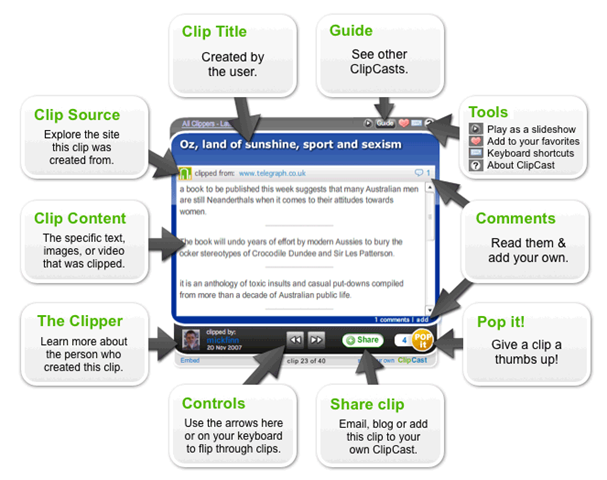
A ClipCast is pretty cool. Basically, you can have a specific topic, i.e. Best Quotes from President Bush, and then clip items from several sites that will then be displayed as a widget where people can flip through all of the clips. They can also post comments on your collection of clips, play it as a slideshow, give it a rating, share the clipcast, etc.

You can also include videos from YouTube in a clipcast directly and it will play fine. Other sites will provide a link to the source website. You can also add your clipcasts to Facebook by installing the app.
The really nice thing about Clipmarks is that when you clip something, you get to name it, add tags or keywords, and make it public or private. Also when performing a search, you can follow the same syntax as when you perform a Google search. That means you can use the AND, OR, NOT boolean operators to search. You can also include quotes for exact matches.
The other really cool thing about Clipmarks that Listas is lacking is the Digg style voting system that they have on their front page for public clipmarks.

Finally, the clip-to-blog feature allows you to instantly share things you find on the web by posting them to your blog. It supports, Blogger, Wordpress, Typepad, LiveJournal, Moveable Type, and Vox.
Overall, it’s a great web notebook
and better than Listas and maybe even Google Notebook. It’s fast, easy to use, and has some really nice features, like searching, Facebook app, and the ClipCasts. Enjoy!
-
-
-
Add Sticky Note
- Save them on Clipmarks.com Your clips can be saved publicly for others to learn from or be entertained by, or you can make them private. Either way you've got a fully searchable collection of great things you find on the web.
- Post them directly to your blog Clipmarks offers direct integration with wordpress, blogger, typepad, live journal and other blogging platforms, enabling you to post anything you clip from a web page directly to your blog. demo
- Email them to friends Straight from any web page you can clip and email something you want friends, family or co-workers to see. demo
- Print them Don't waste paper or get annoyed trying to copy and paste to a Word document. Use clipmarks to easily print only the parts of the page you want.
nstead of linking to entire web pages, Clipmarks lets you clip exactly what you want others to see. Our browser add-on lets you save and share what you're reading on the web with greater precision than is possible with links. There are lots of things you can do with your clips:
-
<span> Not sure if you can organize this into notebooks and share singal notebooks.<br /></span>
-
-
-
Both of these services are potentially useful by allowing you to easily save the relevant part of a website, without saving all the fluff around it. But they are not without their drawbacks. Clipmarks has a few annoying quirks, namely that once you've clicked the save button, you can't delete pieces of your clip -- if you made a mistake you have to start over, and that it organizes your clip by the order you clicked on each piece (and you can't change the order). Further, both services would be more useful if you could highlight specific pieces of a website, rather than only what it identifies as clips. A number of times with each service I wanted to save a specific paragraph, only to find that it hadn't identified that paragraph, or had lumped it together with stuff I didn't want. You also can't save a single sentence from the middle of a block of text.
-
-
Diigo
-
-
- Join Diigo|
- Sign in(accept openid) |
- Help
- Don't just bookmark! Highlight the web! Add sticky notes too!
- Access and search your findings from any PC or iphone!
- Create groups to pool resources for specific projects.
- You are what you annotate, creating a presence for you in the community.
- Connect with friends effortlessly and non-intrusively through content.
- Discover quality resources on any subject or get personalized recommendations.
- Learn More »

Highlight and Share the Web!
Diigo is a powerful research tool and a knowledge-sharing community
Research and Collaborate
Connect and Discover

-
-
Evernote
-
-
Notefish is not as feature-rich as Evernote but still useful. With the Notefish browser add-on, you quickly clip a Web page, store it on the Web, then organize it and share it. The organizing feature functions by dragging and dropping your clips to arrange them on a page. So you could be planning a business trip and clip conference details, airline prices, hotel information, and restaurant listings straight from websites, save them on a single Notefish page, and then drag and drop the pieces of information until the page looks the way you want it to look such as in the order you'll visit the places during your trip. You can also add color to your clippings and annotate them. Notefish is positioned as a Web research tool.
-
Fancy Clipping AppsOne of the more elegant clipping apps is called Evernote. Just highlight text or images on any Web page and save to your Evernote account. You'll not only get a screenshot of what you've selected but also the URL for the content so you can return to the site. You can use the Evernote bookmarklet, that is, a browser button, to trigger the clipping function.With Evernote, you can search the clippings for particular content, even content within images. And then the Evernote iPhone app let's you carry the power of the Web application to the offline world. Take a picture of something you want to store in Evernote with your iPhone's camera -- such as somebody's business card -- and upload to your Evernote account for the same search functionality and easy access. You can also review clippings on your iPhone or iPod Touch. Evernote is meant to be a fully searchable and accessible archive of your clippings.
-
-
Ma.gnolia.com
-
Notefish
-
Springnote
-
-
Add Sticky Note
Can I use Springnote with any browser?
Currently Springnote supports Microsoft Internet Explorer 6, Microsoft Internet Explorer 7, Mozilla Firefox 2, and Mozilla Firefox 3. Springnote requires no installation whatsoever and is executed from within your Internet browser.
Using other web browsers (Safari, Opera, etc.) may cause unappropriate results and may cause Springnote to not function correctly. Please use one of the following compatible browsers listed below.
Springnote Compatible Internet Browsers
-
<span> Springnote looks similar, BUT no support for Safari (on iPods). Good that there is no download to use in Firefox. Will try out first.<br /></span>
-
-
-
-
Springnote is a free online notebook based on wiki
If you ever have anything to do with things such as ideas, content, projects, or documents, Springnote is the way to go.
Springnote allows you to create pages, to work on them together with your friends, and to share files. Springnote is also a great tool for group projects as it allows group members to easily collaborate. Advanced search, numerous templates, and 2GB of FREE File Storage are only few examples of how Springnote can help you. Of course, you already know that Springnote is an Internet service, meaning you can access it from anywhere anytime.
-
-
Ubernote
-
-
-
What is UberNote?
UberNote was developed to address a need for an advanced, all purpose web-based notes application. It is a productivity tool which requires no installation, and notes are accessible from the home, office, client site, or anywhere.
Additionally, UberNote has many advanced features you won't find anywhere else, such as UberClip and UberMark--check them out in our Features section.
-
-
-
Add Sticky Note
UberNote Features
Standard Edition Price Free Note Storage Unlimited Web App Full Featured NO INSTALL AJAX WebApp 
Tags - To organize your notes Full Featured Note Editor Auto Save - Saves notes automatically
as you typeFull Text Search - Search terms In-note Task Items Built-in Bookmark Search Open Task Search International Friendly - Local timezone,
accented characters welcomeBrowser Compatibility Internet Explorer 6 Internet Explorer 7 Firefox 2 Firefox 3 Safari 3 Daily Server Backup of All Data Active Support Forum UberMail - Submit notes via private email UberMark - Bookmarking bookmarklet UberClip - Web clipping bookmarklet Note History - View a history of changes
to your notesFirefox Toolbar iPhone and Mobile - Use UberNote from
your mobile deviceNew! Note Sharing - Share notes with friends New! Attachments - Attach files to your notes New! Public Pages - Make selected notes
public for anyone to viewNew! Backup Notes - Download your notes
and save them on your hard driveComing Soon iGoogle Gadget Open API -
<span> Has everything, but is everything too much for a beginner? Will it have to many distractions? Will try this one. Again, no download.<br /></span>
-
-
UberClip
UberClip makes it easy to clip any content from any page.
Once you have the bookmarklet installed you'll be able to select content with your mouse, or clip entire web pages directly into your notes.
For a demonstration of what your clips will look like, check out our Web Clips demo.
-
-
Zoho Notebook




List Comments
(0)
List Info

23 items | 30 visits