
This link has been bookmarked by 19 people . It was first bookmarked on 07 Aug 2006, by Phoenix Wu.
-
24 Mar 10
-
04 Oct 09

-
28 Jul 09
-
08 Jul 08
-
09 Feb 08
-
Its important that you can use only 1 httptunnel per port! Another Hint: the logging goes to the Windows application log!
-
-
14 Jun 07
-
27 Apr 07
-
11 Dec 06
-
07 Aug 06

-
Now start a session from your Workstation to the MiddleServer:
-
Change to the "Tunnels Tab" and enter the REMOTE forwarded port:
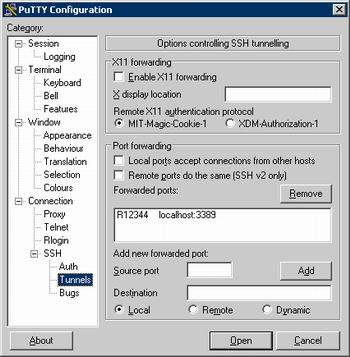
BUT the SSH server is of course localhost:900 (through the httptunnel). -
RemoteServer:
Start HTTPtunnel client, forward local port 900 to MiddleServer port 80 (make sure your Web Server is NOT running!):
# htc --forward-port 900 --proxy HTTPProxy:8080 MiddleServer:80 -
MiddleServer:
Start HTTPtunnel on MiddleServer, forward port 80 (incoming) to local SSH Port:
# hts --forward-port localhost:22 80
-


Would you like to comment?
Join Diigo for a free account, or sign in if you are already a member.