
This link has been bookmarked by 34 people . It was first bookmarked on 31 Mar 2007, by Marcel Weiss.
-
17 Jun 07
-
17 Apr 07
-
04 Apr 07
-
02 Apr 07
-
01 Apr 07
-
31 Mar 07
-
 David Clarke
Scott Hanselman's Thoughts - .NET, Web Services, Life, Travel, C#, Windows, VB.NET, Zimbabwe, XML, Musings, Beat Poetry, and Zen Koans
-
 Colleen Wainwright
Now that I'm a dad, I've been thinking more and more about preparing my family for the unknown. I'm not a paranoid or an alarmist (at least, I don't think I am, but that doesn't mean they're not after me...) but I do think that there's little excuse for n
-
-
Make an [encrypted] Emergency Getaway Drive
Everyone's got a few USB Thumbdrives around. My favorite is a 2GIG, but I really should get a smaller 128 that would fit on a keychain. There's a great article at the NYTimes that offers some pointers as to what you should save on your drive:
SCAN: Some important documents are on paper and you will want copies of them with you: tax returns for the last three years (Form 1040 is all you will need in an emergency), a recent pay stub, birth certificates, marriage license, the deed to your home and insurance policy pages that list your coverage. If you do not have a scanner or a printer with a flat scanner, take the pile of documents down to a copy center like Kinko's to scan. Record the image files on the U.S.B. drive. [NYTimes]
In order to be secure, you'll want to make sure everything on your drive is encrypted. I use two programs to manage my data securely, one for passwords, and one for disks.
I've tried a million "password management" tools and the only one I've stuck with is Keith Brown's Password Minder. It meets all my criteria: It's lightweight, zero install, written in .NET, source is available, and stores its data in XML. The next step is to encrypt your files.
Encrypt/Secure your Life
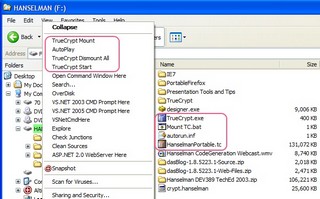 Now, to encrypt important data on a disk, there's a number of options. My favorite is a fantastic Open Source system called TrueCrypt. It's also open source, and offers a number of attractive features for use with removable drivers. It can be used without installation (meaning it can be run off the USB disk directly,) its data files are indistinguishable from random data. You can encrypt an entire volume, or mount a disk file. Personally, I'm a fan of the "single opaque file I can mount" way of thinking.
 TrueCrypt can create a traveler disk that includes an autorun.inf that will make mounting your USB drive automatic upon insertion. For example it created this Autorun.inf:
[autorun]
open=TrueCrypt\TrueCrypt.exe /q /a /e /m rm /v "\HanselmanPortable.tc"
shell=mount
action=Mount TrueCrypt Volume
shell\open\command=TrueCrypt\TrueCrypt.exe /e /m rm /v "\HanselmanPortable.tc"
shell\open=TrueCrypt Start
shell\mount\command=TrueCrypt\TrueCrypt.exe /q /a /e /m rm /v "\HanselmanPortable.tc"
shell\mount=TrueCrypt Mount
shell\dismount\command=TrueCrypt\TrueCrypt.exe /q /d
shell\dismount=TrueCrypt Dismount AllThis autorun.inf gives you a friendly right-click series of extensions even though TrueCrypt isn't installed on the host system (see picture at right). TrueCrypt totally fits the bill for encrypting my personal data. If I lost my USB disk I wouldn't feel that my personal security had been compromised. It also includes support for Linux.
-
-
05 Jan 06
-
03 Jan 06
-
31 Dec 05


Would you like to comment?
Join Diigo for a free account, or sign in if you are already a member.