


best ever
This link has been bookmarked by 129 people . It was first bookmarked on 20 Jun 2006, by Rob Munger.
-
10 Aug 12
-
The screenshots
-
-
01 Aug 12
 devorah milechi
"age and scan through all your research findings quickly. Public sticky notes allow you to exchange viewpoints on any specific area of a webpage. It is great for collaboration or debating an i"
-
06 Jul 12
-
t match exactly wha
-
te and toolbar
-
In-Situ Sticky Note
-
-
08 Sep 10
-
ny part of a webpage you highlighted, just like you'd on paper. With Diigo's virtual highlighter and digital sticky notes, now you can highlight & jot down your comments directly on any part of a webpage and scan through all your research findings quickly. Public sticky notes allow you to exchange viewpoints on any specific area of a webpage. It is great for collaboration or debating a
-
-
28 Sep 09
-
You can add
-
You can add Diigo's In-Situ Sticky Notes
-
-
01 May 09
-
ow you can highlight & jot down your comments directly on any part of a webpage and scan through all your research findings quickly. Public sticky notes allow you to exchange viewpoints on any specific area of a webpage. It is great for collaboration or debating an issue!
To add a sticky note, highlight a block of text first. Then, right-click within the highlighted area, and select "ADD STICKY NOTE" from the menu. If the floating menu (see below) is turned on (which can be set using the toolbar's Options
-
-
13 Apr 08
-
hovering over a highlight will bring up a men u that lets > you add sticky notes: >
-
-
18 Mar 08
-
12 Mar 08
-
To add a sticky note, highlight a block of text first. Then, right-click within the highlighted a
-
-
06 Feb 08
-
18 Jan 08
-
19 Dec 07
-
blic sticky notes allow you to exchange viewpoints on any specific area of a webpage. It is great for collaboration or debating an issue!
-
-
11 Dec 07
-
30 Nov 07
-
Then, right-click within the highlighted area, and select "ADD STICKY NOTE" from the menu. If the floating menu (see below) is turned on (which can be set
-
-
27 Nov 07
-
You can add Diigo's In-Situ Sticky Notes on any part of a webpage you highlighted, just like you'd on paper. With Diigo's virtual highlighter and digital sticky notes, now you can highlight & jot down your comments directly on any part of a webpage and scan through all your research findings quickly. Public sticky notes allow you to exchange viewpoints on any specific area of a webpage. It is great for collaboration or debating an issue!
-
-
26 Nov 07
-
findings
-
-
25 Nov 07
-
06 Nov 07
-
To add a sticky note, highlight a block of text first. Then, right-click within the highlighted area, and select "ADD STICKY NOTE" from the menu. If the floating menu (see below) is turned on (which can be set using the toolbar's Options menu), hovering over a highlight will bring up a menu that lets you add sticky notes:
-
-
30 Oct 07
-
Add Sticky NoteIn-Situ Sticky Notes
-
-
great
- 1 more sticky notes...
-
-
how come in other sticky notes i am unable to add comments.... hmmm
-
-
-
-
27 Oct 07
-
26 Oct 07
-
09 Oct 07
-
You can add Diigo's In-Situ Sticky Notes on any part of a webpage you highlighted, just like you'd on paper. With Diigo's virtual highlighter and digital sticky notes, now you can highlight & jot down yo
-
-
26 Sep 07
-
highlight a block of text firs
-
-
04 Sep 07
-
You can add Diigo's In-Situ Sticky Notes on any part of a webpage you highlighted, just like you'd on paper. With Diigo's virtual highlighter and digital sticky notes, now you can highlight & jot down your comments directly on any part of a webpage and scan through all your research findings quickly. Public sticky notes allow you to exchange viewpoints on any specific area of a webpage. It is great for collaboration or debating an issue!
To add a sticky note, highlight a block of text first. Then, right-click within the highlighted area, and select "ADD STICKY NOTE" from the menu. If the floating menu (see below) is turned on (which can be set using the toolbar's Options menu), hovering over a highlight will bring up a menu that lets you add sticky notes:
-
-
31 Jul 07
-
o add a sticky note, highlight a block of text first
-
-
26 Jun 07
-
07 Jun 07
-
06 May 07
-
To add a sticky note, highlight a block of text first. Then, right-click within the highlighted area, and select "ADD STICKY NOTE" from the menu. If the floating menu (see below) is turned on (which can be set using the toolbar's Options menu), hovering over a highlight will bring up a menu that lets you add sticky notes:
-
-
05 May 07
-
12 Apr 07
-
07 Apr 07
-
Sticky Notes Basics
You can add Diigo's In-Situ Sticky Notes on any part of a webpage you highlighted, just like you'd on paper. With Diigo's virtual highlighter and digital sticky notes, now you can highlight & jot down your comments directly on any part of a webpage and scan through all your research findings quickly. Public sticky notes allow you to exchange viewpoints on any specific area of a webpage. It is great for collaboration or debating an issue!
To add a sticky note, highlight a block of text first. Then, right-click within the highlighted area, and select "ADD STICKY NOTE" from the menu. If the floating menu (see below) is turned on (which can be set using the toolbar's Options menu), hovering over a highlight will bring up a menu that lets you add sticky notes:
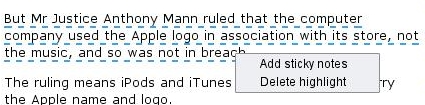
User can delete (but not edit) his own sticky notes. >
-
-
27 Mar 07
-
15 Mar 07
-
"ADD STICKY NOTE"
-
To add a sticky note, highlight a block of text first. Then, right-click within the highlighted area
-
-
12 Mar 07
-
08 Mar 07
-
ight a block of text first. Then, right-click within the highlighted area, and select "ADD STICKY NOTE" from the menu. If the floating menu (see below) is turned on (which can be set using the toolbar's Options menu), hovering over a highlight will bring up a menu that lets you add sticky notes:
-
-
06 Mar 07
-
To add a sticky note, highlight a block of text first. Then, right-click within the highlighted area, and select "ADD STICKY NOTE" from the menu. If the floating menu (see below) is turned on (which can be set using the toolbar's Options menu), hovering over a highlight will bring up a menu that lets you add sticky notes:
-
-
02 Mar 07
-
You can add Diigo's In-Situ Sticky Notes on any part of a webpage you highlighted, just like you'd on paper. With Diigo's virtual highlighter and digital sticky notes, now you can highlight & jot down your comments directly on any part of a webpage and scan through all your research findings quickly. Public sticky notes allow you to exchange viewpoints on any specific area of a webpage. It is great for collaboration or debating an issue!
-
-
01 Mar 07
-
28 Feb 07
-
26 Feb 07
-
The screenshots in the help section have not been updated to reflect recent changes in the website and toolbars, so they may not match exactly what you see on your screen. The help section will be updated shortly.
-
-
20 Feb 07
-
digital sticky notes
-
-
-
h can be se
-
-
19 Feb 07
-
You can add
-
-
16 Feb 07
-
ght & j
-
-
15 Feb 07
-
With Diigo's virtual highlighter
-
notes, now you can highlight & jot down your comments
-
highlight & jot down your comments directly on any part
-
-
11 Feb 07
-
10 Feb 07
-
08 Feb 07
-
n-Situ Sticky Notes on any part
-
-
24 Jan 07
-
ual highlighter and digital sticky notes, now you can highlight & jot down your comments directly on any part of a webpage and scan through all your research findings quickly. Public sticky notes allow you to exchange viewpoints on any specific area of a webpage. It is great for collaboration or debating an issue!
-
-
09 Jan 07
-
To add a sticky note, highlight a block of text first. Then, right-click within the highlighted area, and select "ADD STICKY NOTE" from the menu. If the floating menu (see below) is turned on (which can be set using the toolb
-
-
29 Dec 06
-
You
-
-
26 Dec 06
-
19 Dec 06
-
-
ight-click within
-
-
14 Dec 06
-
n add Diigo's In-Situ Sticky Notes on any part of a webpage you highlighted, just like you'd on paper. With Diigo's virtual highlighter and digital sticky notes, now you can highlight & jot down your comments directly on any part of a webpage and scan thr
-
-
05 Dec 06
-
highlighted
-
-
29 Nov 06
-
Add Sticky NoteUser can delete (but not edit) his own sticky notes.
-
A work around is, copy the old edit, delete it, and make a new annotation, based on the old one, pasting and editing it.<br>
-
We now allow users to edit his own sticky notes as long as there is no follow-on public ones. <br>
- 10 more sticky notes...
-
-
Hello everyone
-
Hello, this is cool.<br>
-
THIS IS GREAT
-
HELLO EVERYONE
-
WREHATS UP HOW ARE YOU
-
Very good, but I would prefer more option selection about how the sticky note will appear.
Thanks for this :) -
Test...have a try.<br>
-
how can i jump/go to a sticky note on a website? (2nd time edited)
-
do pici sem nasranej, nechapu to<br>
-
This is great
-
-
-
-
26 Nov 06
-
a block of text first. Then, right-click within the highlighted area, and select "ADD STICKY NOTE" from the menu. If the floating menu (see below) is turned on (which can be set using the toolbar's Options menu), hovering over a highlight will bring up a menu that lets you add sticky notes:
-
-
17 Nov 06
-
f a webpage and scan through all your research findings
-
-
11 Nov 06
-
You can add Diigo's In-Situ Sticky Notes on any part of a webpage you highlighted, just like you'd on paper. With Diigo's virtual highlighter and digital sticky notes, now you can highlight & jot down your comments directly on any part of a webpage and scan through all your research findings quickly. Public sticky notes allow you to exchange viewpoints on any specific area of a webpage. It is great for collaboration or debating an issue!
-
-
10 Nov 06
-
's In-Situ Sticky Notes
-
-
01 Nov 06
-
ext first. Then, right-click within the highlighted area, and select "ADD STICKY NOTE" from the menu. If the floating menu (see below) is turned on (which can be set u
-
-
31 Oct 06
-
You can add Diigo's > In-Situ > Sticky Notes > on any part of a webpage you highlighted, just like you'd on paper. > With Diigo's virtual highlighter and digital sticky notes, now you can > highlight & jot down your comments directly on any part of a webpage and scan > through all your research findings quickly. Public sticky notes allow you to > exchange viewpoints on any specific area of a webpage. It is great for > collaboration or debating an issue! >
To add a sticky note, highlight a block of text first. Then, right-click within the highlighted area, and select "ADD STICKY NOTE" from the menu. If the floating menu (see below) is turned on (which can be set using the toolbar's Options menu), hovering over a highlight will bring up a menu that lets you add sticky notes:
-
-
24 Oct 06
-
Sticky
-
-
21 Oct 06
-
hovering over a highlight
-
-
06 Oct 06
-
You can add Diigo's In-Situ Sticky Notes on any part of a webpage you highlighted, just like you'd on paper. With Diigo's virtual highlighter a
-
, right-click within the highlighted area, and select "ADD STICKY NOTE" from the menu. If the floating menu (see below) is turned on (which can be set using the toolbar's Options menu), hovering over a highlight will bring up a menu that lets you add sticky notes:
-
-
25 Sep 06
-
floating menu
-
-
21 Sep 06
-
14 Sep 06
-
now you can highlight
-
-
02 Sep 06
-
our research findings quickly. Public sticky notes allow you to exchange viewpoints on any specific area of a webpa
-
To add a sticky note, highlight a block of text first. Then, right-click within the highlighted area, and select "ADD STICKY NOTE" from the menu. If the floating menu (see below) is turned on (which can b
-
-
01 Sep 06
-
iigo's In-Situ Sticky Notes on any part of a webpage you highlighted, just like you'd on paper. With Diigo's virtual highlighter and digital sticky notes, now you can highlight & jot down your comments directly on any part of a webpage and scan through all your research findings quickly. Public sticky notes allow you to exchange viewpoints on any specific area of a webpage. It is great for collaboration or debating an issue!
-
-
25 Aug 06
-
It is great for collaboration or debating an issue!
-
-
24 Aug 06
-
20 Aug 06
-
any part of a webpage you highlighted, just like you'd on paper. With Diigo's virtual highlighter and digital sticky notes, now you can highlight & jot
-
-
06 Aug 06
-
To add a sticky note, highlight a block of text first. Then, right-click within the highlighted area, and select "ADD STICKY NOTE" from the menu. If the floating menu (see below) is turned on (which can be set using the toolbar's Options menu), hovering over a highlight will bring up a menu that lets you add sticky notes:
-


Public Stiky Notes
Thanks for this :)
Page Comments
Would you like to comment?
Join Diigo for a free account, or sign in if you are already a member.