This link has been bookmarked by 4 people . It was first bookmarked on 07 Apr 2007, by Moultrie Creek.
To customize your preferred search engines in Diigo's "MULTIPLE CATEGORY SEARCH", click "CUSTOMIZE" link in either the Multiple Category Search pull-down menu, or in the toolbar Options:
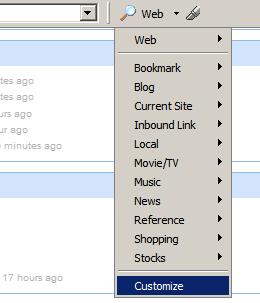 in the multiple category search pull-down | 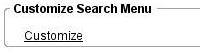 in Toolbar's Options panel |
The "Search Menu Customization" page will show up:

Edit, drag and drop the search categories and engines until you're satisfied with the result. When you're done, make sure to click "SAVE ALL", so all the changes you made will actually be saved.
Tips:

 .
. 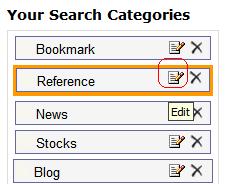 Select category, and click "Edit" icon | 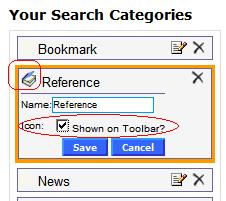 Once expanded, check off "Icon" box |
Reference Search Icon will then be shown on your toolbar:



Would you like to comment?
Join Diigo for a free account, or sign in if you are already a member.