
This link has been bookmarked by 6 people . It was first bookmarked on 21 Jan 2007, by Moultrie Creek.
-
27 Nov 07
-
the Diigo toolbar's "MULTIPLE CATEGORY SEARCH" feature is extremely powerful, and allows you quick access to multiple search categories, each with multiple search engines, and all customizable. ( In fact, many users mention that Diigo's toolbar is worth installing for just this feature alone!)
-
-
07 Apr 07
-
- All the above search features can be accessed through the right-click menu or content selection menu after selecting some words on a page. Selected words will be captured in the search box for your convenience.
- Use the Word Find and Highlight buttons to the right of the search box, to find and highlight words in the search box on the current page. (Note: this highlight, unlike highlighting by clicking Diigo button, is not saved.)
- For Firefox, to access search engines that are not the default search engine for that category, you need to go into the category submenu. You can also right-click the category to conduct search with all engines in the category, and search results will open up into multiple tabs.
- For Internet Explorer, there is no category submenu. Instead, mouse-over the down-arrow to the right of the search button to access other search engines in the same category.
Multiple Category Search
In addition to bookmark search, the Diigo toolbar's "MULTIPLE CATEGORY SEARCH" feature is extremely powerful, and allows you quick access to multiple search categories, each with multiple search engines, and all customizable. ( In fact, many users mention that Diigo's toolbar is worth installing for just this feature alone!)
In the example shown below, entering the search term "ajax" in the toolbar search box, and clicking "Web" will access the default web search engine. And accessing the pull-down menu under "Web" shows all the categories in which you can search. Clicking "Reference" in the pull-down menu will send the search to the default reference search engine ( in this case, Wikipedia).
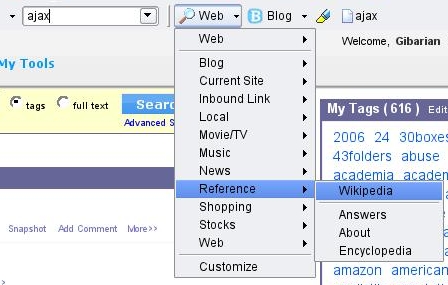
To learn how to customize your search engine preferences, visit Customize Search Menu.
Tips:
-


Would you like to comment?
Join Diigo for a free account, or sign in if you are already a member.