


ha!Maggie_diigo~
This link has been bookmarked by 87 people . It was first bookmarked on 14 Jun 2006, by Emily.
-
11 Sep 12
-
To Forward a page, also first click "Tag this page", then click "Forward" link as shown above. -
To highlight some text, select a block of text, "Highlight" link will automatically show up. Click it to mark the highlight:
-
-
23 Mar 12
-
20 Jun 11
-
11 Jun 10
-
The first thing to remember about Diigolet is that it is not available until you request it by clicking the Diigolet button. And once you go to a new page, you have to request it again.
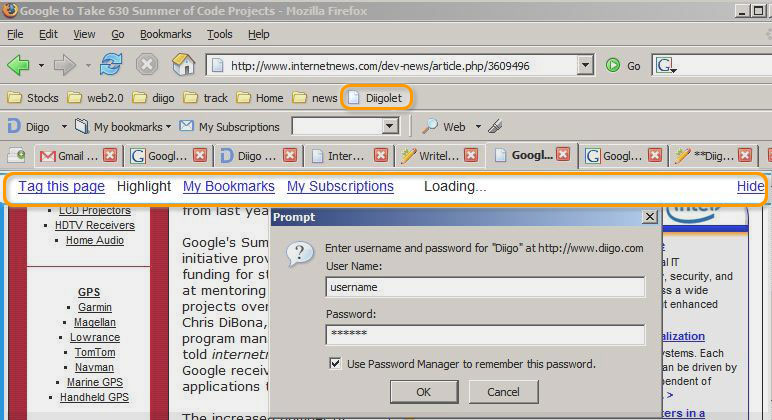
So to view or make annotations on any page, click the "Diigolet" button. A slim "Diigolet toolbar" will slide down on the top of your browser as shown below. Our system will prompt you to enter your username / password. (Note: click "Hide" to make the Diigolet toolbar disappear, and click "Diigolet" button again to re-appear.)
-
-
21 May 10
-
20 Apr 10
-
" link will automatically show up.
-
link will automatically show up.
-
link will automatically show up
-
-
19 Apr 10
-
The first thing to remember about Diigolet is that it is not available until you request it by clicking the Diigolet button. And once you go to a new page, you have to request it again.
So to view or make annotations on any page, click the "Diigolet" button.
-
To highlight some text, select a block of text, "Highlight" link will automatically show up. Click it to mark the highlight:
-
-
21 Jan 10
-
a new page, you have to request it again.
So to view or make annotations on any page, click the "Diigolet" button. A slim "Diigolet toolbar" will slide down on the top of your browser as shown below. Our sys
-
-
09 Jan 10
-
25 Dec 09
-
The first thing to remember about Diigolet is that it is not available until you request it by clicking the Diigolet button. And once you go to a new page, you have to request it again.
-
The first thing to remember about Diigolet is that it is not available until you request it by clicking the Diigolet button. And once you go to a new page, you have to request it again. -
rst thing to remember about Diigolet is that it is not available until you request it by clicking the Diigolet button. And once you go to a new page, you have to request it again.
-
The first thing to remember about Diigolet is that it is not available until you request it by clicking the Diigolet button. And once you go to a new page, you have to request it again.
-
-
11 Nov 09
-
To highlight some text, select a block of text, "Highlight" link will automatically -
select
-
-
25 Sep 09
-
17 Aug 09
-
not available until you request it
-
-
23 Jul 09
-
21 Jul 09
-
17 Jul 09
-
13 Jul 09
-
Forward" link as shown above
-
-
05 Jul 09
-
19 Jun 09
-
To highlight some text, s
-
-
25 May 09
-
Diigolet
-
Diigolet
-
Diigolet
-
-
17 May 09
-
15 May 09
-
Now that Diigolet is active for this page, if there is any highlight or sticky note on that page for you, then you should see them
To bookmark a page, click "Tag this page".
-
-
25 Mar 09
-
20 Mar 09
-
The first thing to remember about Diigolet is that it is not available until you request it by clicking the Diigolet button. And once you go to a new page, you have to request it again.
So to view or make annotations on any page, click the "Diigolet" button. A slim "Diigolet toolbar" will slide down on the top of your browser as shown below. Our system will prompt you to enter your username / password. (Note: click "Hide" to make the Diigolet toolbar disappear, and click "Diigolet" button again to re-appear.)
-
-
28 Feb 09
-
he first thing to remember about Diigolet is that it is not available until you request it by clicking the Diigolet button. And once you go to a new page, you have to request it again.
So to view or make annotations on any pag
-
-
18 Jan 09
-
"Highlight" link will automatically show up
-
-
05 Jan 09
-
once you go
-
-
27 Dec 08
-
How To Use Diigolet
-
The first thing to remember
-
How To Use Diigolet
-
click the "Diigolet" button
-
(Note: click "Hide" to make the Diigolet toolbar disappear, and click "Diigolet" button again to re-appear.)
-
-
08 Dec 08
-
Add Sticky Note
-
dddddddddddddddd
-
-
Add Sticky Noteadd a sticky note, simply mouse
-
ffffffffffffffffff
-
-
-
03 Dec 08
-
on any page, click
-
-
01 Nov 08
-
Click it to mark the highligh
-
-
23 Sep 08
-
Now that Diigolet is active for this page, if there is any highlight or sticky note on that page for you, then you should see them
To bookmark a page, click "Tag this page". A bookmarking window will slide in from the left. (Note: click on any space and the window will disappear.)
-
-
18 Jun 08
-
21 Apr 08
-
12 Apr 08
-
11 Apr 08
-
08 Apr 08

-
02 Apr 08
-
Add Sticky Note
-
testando
-
-
he first thing to remember about Diigolet is that it is not available until you request it by clicking the Diigolet button. And once you go to a new page, you have to request it again.
So to view or make annotations on any page, click the "Diigolet" button. A slim "Diigolet toolbar" will slide down on the top of your browser as shown below. Our system will prompt you to enter your username / password. (Note: click "Hide" to make the Diigolet toolbar disappear, and click "Diigolet" button again to re
-
-
16 Mar 08
-
11 Mar 08
-
04 Feb 08
-
03 Feb 08
-
The first thing to remember about Diigolet is that
-
-
01 Feb 08
-
20 Nov 07
-
17 Nov 07
-
m "Diigolet toolba
-
-
18 Oct 07
-
Add Sticky NoteHow To Use Diigolet
-
test
-
-
Now that Diigolet is active for this page, if there is any highlight or sticky note on
-
-
08 Sep 07
-
01 Aug 07
-
The screenshots in the help section have not been updated to reflect recent changes in the website and toolbars, so they may not match exactly what you see on your screen. The help section will be updated shortly.
-
-
-
age for you, then you should see them
To bookmark a page, click " Tag this page > " >. A bookmarking window will slide in from the left. (Note: clic
-
Tag this page"
-
-
20 Jul 07
-
The first thing to remember about Diig
-
-
18 Jul 07
-
ve to request it again.
So to view or make annotations on any page, click the "Diigolet" butt
-
-
07 Jun 07
-
05 Jun 07
-
16 May 07
-
highlight, "Add Sticky Notes" link will automatic
-
-
29 Apr 07
-
27 Apr 07
-
st thing to remem
-
-
25 Apr 07
-
he screenshots in the help section have not been updated to reflect recent changes in the website and toolbars, so they may not match exactly what you see on your screen. The help section will be updated shortl
-
-
14 Apr 07
-
07 Apr 07
-
How To Use Diigolet
The first thing to remember about Diigolet is that it is not available until you request it by clicking the Diigolet button. And once you go to a new page, you have to request it again.So to view or make annotations on any page, click the "Diigolet" button. A slim "Diigolet toolbar" will slide down on the top of your browser as shown below. Our system will prompt you to enter your username / password. (Note: click "Hide" to make the Diigolet toolbar disappear, and click "Diigolet" button again to re-appear.)
Now that Diigolet is active for this page, if there is any highlight or sticky note on that page for you, then you should see themTo bookmark a page, click "Tag this page". A bookmarking window will slide in from the left. (Note: click on any space and the window will disappear.)
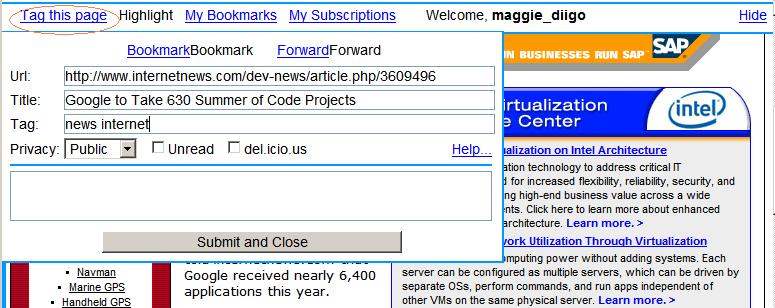
To Forward a page, also first click "Tag this page", then click "Forward" link as shown above.
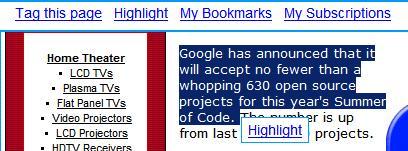
To highlight some text, select a block of text, "Highlight" link will automatically show up. Click it to mark the highlight:
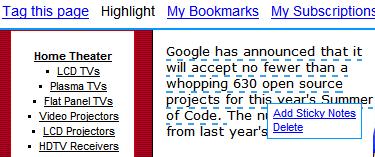
To add a sticky note, simply mouse-over the highlight, "Add Sticky Notes" link will automatically show up.
-
-
04 Apr 07
-
22 Mar 07
-
01 Mar 07
-
16 Feb 07
-
hing to remember about Diigolet is that it is not available until you request it by clicking the Diigolet button. And once you go to a new page, you have to request it again.
So to view or make annotations on any pa
-
-
06 Feb 07
-
make annotations
-
Highlight" link will automatically show up
-
-
04 Feb 07
-
Diigolet
-
-
11 Oct 06
-
o remember about D
-
-
14 Jun 06


Public Stiky Notes
Page Comments
Would you like to comment?
Join Diigo for a free account, or sign in if you are already a member.