
This link has been bookmarked by 29 people . It was first bookmarked on 19 Jul 2006, by Brendan M.
-
21 Nov 11
-
02 Aug 11
-
29 Jun 11
 Ben Curran
@elanaleoni Here is the information on simultaneous bookmarking - http://www.diigo.com/help/bookmark/3 #diigolearn #iste11
-
28 Jun 11
 Joe Jacquot
Gr8 thx! RT @coolcatteacher: @elanaleoni Here's the info on simultaneous bookmarking - http://bit.ly/kKh97r #diigolearn #iste11
-
22 Dec 10
-
se as well. With Diigo, we make this very easy for you, So you can now take full advantage of Diigo's power without giving up your old services. Almost all the popular online bookmarking services are supported
-
-
16 Dec 10
 winnefox
"... keep adding your bookmarks to those as well. With Diigo, we make this very easy for you, So you can now take full advantage of Diigo's power without giving up your old services. Almost all the popular online bookmarking services are supported."
-
13 Feb 10
-
Inside the toolbar Options menu, you can check the services you want to simultaneously add your bookmarks to, and Diigo will take care of the rest.
-
-
17 Dec 08
-
If you've used other web-based bookmarking services before, you may still wish to keep adding your bookmarks to those as well. With Diigo, we make this very easy for you, So you can now take full advantage of Diigo's power without giving up your old services. Almost all the popular online bookmarking services are supported (see below).
-
-
31 Jan 08
-
Inside the toolbar Options menu, you can check the services you want to simultaneously add your bookmarks to, and Diigo will take care of the rest.
-
-
07 Apr 07
-
Simultaneous Bookmarking Elsewhere
If you've used other web-based bookmarking services before, you may still wish to keep adding your bookmarks to those as well. With Diigo, we make this very easy for you, So you can now take full advantage of Diigo's power without giving up your old services. Almost all the popular online bookmarking services are supported (see below).
Inside the toolbar Options menu, you can check the services you want to simultaneously add your bookmarks to, and Diigo will take care of the rest.
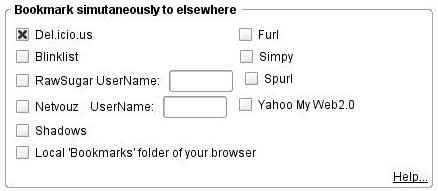
If the "local bookmark folder" option is checked, your bookmarks will be saved in your browser's local folders, with the tags mapped to folder names.And whenever you are bookmarking a website (with the regular bookmarking pop-up window, not the QuickD button), you will be able to decide on the fly whether you want to add these to the services you checked in the options menu. Tags, comments, and privacy option are mapped and transmitted to appropriate parameters of the other services if they are available.

-
-
05 Apr 07
-
17 Nov 06
-
If you've used other web-based bookmarking services before, you may still wish to keep adding your bookmarks to those as well. With Diigo, we make this very easy for you, So you can now take full advantage of Diigo's power without giving up your old services. Almost all the popular online bookmarking services are supported (see below).
-
-
19 Aug 06
-
01 Aug 06
-
31 Jul 06
-
25 Jul 06
-
19 Jul 06


Would you like to comment?
Join Diigo for a free account, or sign in if you are already a member.