
This link has been bookmarked by 166 people . It was first bookmarked on 02 Mar 2006, by Kelley Perry.
-
19 Apr 12
-
the
divelements don't "stretch" to contain the floated images within them. To look at the situation from the reverse angle, it happens because the floated images "stick out" of the bottom of thedivelements. -
ook closely at Figure 2. The floated image is sticking out of its containing element. We can see this more clearly by adding borders to the paragraphs, as shown in Figure 3.
-
now we can see why it's important that floats stick out of their containing elements.
-
If floats are to be used in creating non-table layouts, then there needs to be a way to make their containing elements stretch around them.
-
Since we want the bottom of the containing element to be placed clear past the bottom of the float, then
clearis our answer. We need only insert a block-level element just before the end of the container, and clear it -
In most browsers, and as defined in CSS2.1, a floated element will expand to contain any floated elements that descend from it.
-
div.item {float: left; border: 1px solid; padding: 5px; width: 60%;} div.item img {float: left; margin: 5px;}Note that we've floated both the images and the "item"
divs. By setting thewidthof thedivs to be greater than 50%, we ensure that they will never be next to each other, but will instead stack up vertically. -
However, the hacks discussed thus far are still useful. Suppose you want to put some advisory text underneath the items. In order to keep the text from flowing to the right of the items, we need to insert a clearing hack.
-
The clearing
diveffectively pushes the normal flow downward, forcing any following content to flow after the cleared element, and therefore after the floateddivs.
-
-
22 Feb 12
-
24 Jan 11
-
10 Jan 11
-
03 Dec 10

-
20 Nov 10
-
18 Nov 10
 wayne anderson
Great example of how to clear a float.
-
22 Oct 10
-
03 Sep 10
-
13 Jul 10
-
22 Apr 10
-
29 Jan 10

-
09 Oct 09
-
03 Oct 09
-
17 Sep 09
-
25 Aug 09
 Frances de Waal
About how floats and the normal flow relate to each other and how clearing can be used.
-
24 May 09
-
18 Jan 09

-
15 Nov 08
-
07 Nov 08
-
01 Nov 08
-
26 Sep 08
-
06 Aug 08
-
16 Jun 08
-
23 Apr 08
-
05 Apr 08
-
27 Mar 08

-
18 Feb 08
-
16 Feb 08
-
08 Feb 08
-
06 Feb 08
-
29 Jan 08
 Attila Györffy
As powerful and useful as they are, floats can make for tricky layout tools. Chances are that you may have seen something like the situation shown in Figure 1, which is accomplished with just two div elements, each with a floated image inside it.
-
15 Jan 08
-
14 Jan 08
-
28 Sep 07
-
27 Sep 07
-
01 Aug 07

-
25 Jun 07
 Mattias Wirf
As powerful and useful as they are, floats can make for tricky layout tools.
-
31 Mar 07
 Regis Zaleman
div.item hr {display: block; clear: left; margin: -0.66em 0; visibility: hidden;}
-
07 Mar 07
-
26 Feb 07
-
16 Feb 07
-
11 Feb 07
-
29 Jan 07
-
04 Jan 07
-
19 Dec 06
-
21 Nov 06
-
15 Nov 06
-
07 Nov 06
 Ivana Vasilj
As powerful and useful as they are, floats can make for tricky layout tools. Chances are that you may have seen something like the situation shown in Figure 1, which is accomplished with just two div elements, each with a floated image inside it.
-
06 Nov 06

-
19 Oct 06
-
02 Oct 06
-
26 Sep 06
-
25 Sep 06
-
23 Sep 06
-
07 Sep 06
-
06 Sep 06
-
26 Aug 06
-
we could remove all of the "clearer" elements and instead write these styles:
div.item {float: left; border: 1px solid; padding: 5px; width: 60%;} div.item img {float: left; margin: 5px;}Note that we've floated both the images and the "item"
divs. By setting thewidthof thedivs to be greater than 50%, we ensure that they will never be next to each other, but will instead stack up vertically. This has the result shown in Figure 6.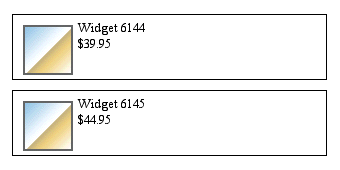 Figure 6. Using floats to stretch around floats.
-
-
18 Aug 06
-
25 Jul 06
-
21 Jun 06
 anthony wheeler
While powerful and useful, floats can also be tricky. This article explains them clearly.
-
20 Jun 06
-
16 Jun 06
-
13 Jun 06
-
30 May 06
-
25 May 06
-
27 Apr 06

-
08 Apr 06
-
05 Apr 06
-
17 Mar 06
-
22 Feb 06
-
20 Feb 06
-
11 Feb 06
-
10 Feb 06
 Fogday Studios
As powerful and useful as they are, floats can make for tricky layout tools. Chances are that you may have seen something like the situation shown in Figure 1, which is accomplished with just two div elements, each with a floated image inside it.
-
06 Feb 06
-
02 Feb 06
 Gianluca Ciralli
Come impedire alle immagini di eccedere il bordo inferiore del div in cui sono contenute
-
25 Jan 06
-
20 Jan 06
-
17 Jan 06
-
16 Jan 06
-
31 Dec 05
-
30 Oct 05
-
28 Oct 05
-
17 Oct 05

-
11 Oct 05
-
02 Aug 05
-
12 Apr 05
-
09 Apr 05

-
27 Dec 04
-
22 Dec 04
-
06 Dec 04
-
20 Nov 04
-
27 Aug 04
-
27 Jul 04
-
20 Jul 04
-
09 Jul 04
-
18 May 04
 Yvonne L
Floats explained
-
17 Feb 04
-
16 Feb 04


Page Comments
Would you like to comment?
Join Diigo for a free account, or sign in if you are already a member.