
This link has been bookmarked by 612 people . It was first bookmarked on 27 Aug 2006, by Shawn Hartsock.
-
15 Apr 18
-
22 Apr 15
 elurie
"Rolling out the mobile-friendly update
Posted: Tuesday, April 21, 2015
As we noted earlier this year, today’s the day we begin globally rolling out our mobile-friendly update. We’re boosting the ranking of mobile-friendly pages on mobile search results. Now searchers can more easily find high-quality and relevant results where text is readable without tapping or zooming, tap targets are spaced appropriately, and the page avoids unplayable content or horizontal scrolling.
" -
20 Apr 15
-
display URLs in the search results to better reflect the names of websites, using the real-world name of the site instead of the domain name, and the URL structure of the sites in a breadcrumbs-like format.
-
-
06 Apr 15
-
12 Mar 15
-
Starting April 21, we will be expanding our use of mobile-friendliness as a ranking signal.
-
-
28 Nov 14
-
14 Aug 14
-
03 Jun 14
-
26 Apr 14
-
10 Apr 14
-
08 Feb 14
-
29 Jan 14
-
10 Nov 13
-
12 Oct 13
-
19 Sep 13
-
12 Sep 13
-
13 Aug 13
-
06 Aug 13
-
05 Aug 13
-
30 Jul 13
-
11 Jul 13
-
14 Jun 13
-
13 Jun 13
-
04 May 13
-
09 Apr 13
-
13 Mar 13
-
11 Mar 13
-
New to Webmaster Central?
The Webmaster Academy will walk you through the basics.
-
-
23 Feb 13
-
08 Nov 12
-
16 Oct 12
-
23 Jun 12
-
10 May 12
-
18 Apr 12
-
31 Jan 12
-
20 Jan 12
 Sjoerd Kranendonk
Webpagina's met tekst direct bovenaan - geen aankeilers of advertenties - gaan hoger scoren in #Google http://t.co/3dcaG8TZ
-
16 Jan 12
-
28 Dec 11
-
27 Nov 11
-
08 Nov 11

-
07 Nov 11
-
30 Oct 11
-
22 Oct 11
-
28 Sep 11
-
27 Sep 11
-
21 Sep 11
-
17 Aug 11
-
12 Aug 11
-
28 Jul 11
-
05 Jul 11
-
03 Jul 11
-
09 Jun 11
-
08 Jun 11
-
03 Jun 11
-
11 May 11
-
13 Apr 11

-
12 Apr 11
-
Introducing the +1 button
Monday, March 28, 2011 at 11:20 AM
Webmaster level: All
We all know what it’s like to get a bit of help when you’re looking for it. Online, that advice can come from a number of places: a tweet, a shared video, or a blog post, to name a few. With Google Social Search we’ve been working to show that content when it’s useful, making search more personally relevant.
We think sharing on the web can be even better--that people might share more recommendations, more often, if they knew their advice would be used to help their friends and contacts right when they’re searching for relevant topics on Google. That’s why we’re introducing the +1 button, an easy way for Google users to recommend your content right from the search results pages (and, soon, from your site).
+1 is a simple idea. Let’s use Brian as an example. When Brian signs in to his Google Account and sees one of your pages in the organic search results on Google (or your search ads if you’re using AdWords), he can +1 it and recommend your page to the world. -
Introducing the +1 button
Monday, March 28, 2011 at 11:20 AM
Webmaster level: All
We all know what it’s like to get a bit of help when you’re looking for it. Online, that advice can come from a number of places: a tweet, a shared video, or a blog post, to name a few. With Google Social Search we’ve been working to show that content when it’s useful, making search more personally relevant.
We think sharing on the web can be even better--that people might share more recommendations, more often, if they knew their advice would be used to help their friends and contacts right when they’re searching for relevant topics on Google. That’s why we’re introducing the +1 button, an easy way for Google users to recommend your content right from the search results pages (and, soon, from your site).
+1 is a simple idea. Let’s use Brian as an example. When Brian signs in to his Google Account and sees one of your pages in the organic search results on Google (or your search ads if you’re using AdWords), he can +1 it and recommend your page to the world. -
Introducing the +1 button
Monday, March 28, 2011 at 11:20 AM
Webmaster level: All
We all know what it’s like to get a bit of help when you’re looking for it. Online, that advice can come from a number of places: a tweet, a shared video, or a blog post, to name a few. With Google Social Search we’ve been working to show that content when it’s useful, making search more personally relevant.
We think sharing on the web can be even better--that people might share more recommendations, more often, if they knew their advice would be used to help their friends and contacts right when they’re searching for relevant topics on Google. That’s why we’re introducing the +1 button, an easy way for Google users to recommend your content right from the search results pages (and, soon, from your site).
+1 is a simple idea. Let’s use Brian as an example. When Brian signs in to his Google Account and sees one of your pages in the organic search results on Google (or your search ads if you’re using AdWords), he can +1 it and recommend your page to the world. -
Labels: advanced, general tips, intermediate
-
Introducing the +1 button
Monday, March 28, 2011 at 11:20 AM
Webmaster level: All
We all know what it’s like to get a bit of help when you’re looking for it. Online, that advice can come from a number of places: a tweet, a shared video, or a blog post, to name a few. With Google Social Search we’ve been working to show that content when it’s useful, making search more personally relevant.
We think sharing on the web can be even better--that people might share more recommendations, more often, if they knew their advice would be used to help their friends and contacts right when they’re searching for relevant topics on Google. That’s why we’re introducing the +1 button, an easy way for Google users to recommend your content right from the search results pages (and, soon, from your site). -
Introducing the +1 button
Monday, March 28, 2011 at 11:20 AM
Webmaster level: All
We all know what it’s like to get a bit of help when you’re looking for it. Online, that advice can come from a number of places: a tweet, a shared video, or a blog post, to name a few. With Google Social Search we’ve been working to show that content when it’s useful, making search more personally relevant.
We think sharing on the web can be even better--that people might share more recommendations, more often, if they knew their advice would be used to help their friends and contacts right when they’re searching for relevant topics on Google. That’s why we’re introducing the +1 button, an easy way for Google users to recommend your content right from the search results pages (and, soon, from your site). -
Introducing the +1 button
Monday, March 28, 2011 at 11:20 AM
Webmaster level: All
We all know what it’s like to get a bit of help when you’re looking for it. Online, that advice can come from a number of places: a tweet, a shared video, or a blog post, to name a few. With Google Social Search we’ve been working to show that content when it’s useful, making search more personally relevant.
We think sharing on the web can be even better--that people might share more recommendations, more often, if they knew their advice would be used to help their friends and contacts right when they’re searching for relevant topics on Google. That’s why we’re introducing the +1 button, an easy way for Google users to recommend your content right from the search results pages (and, soon, from your site). -
working
-
Beyond Times and Arial - The New Web Safe Fonts
Friday, February 18, 2011 at 11:00 AM
Webmaster level: All
In the past, when you created a website or web app, you were largely limited to a few select “web safe” fonts such as Times and Arial. If you deviated from these fonts, you were required to use Adobe Flash or to embed text in images, which introduced a whole new set of trade offs. For example, images aren’t semantic, cannot be translated into other languages automatically, and can be much larger in file size than text. In addition, text in images cannot be copied to a user’s clipboard, read with screen-reading software, or easily indexed by search engines.
The good news is, with Google Web Fonts it is now possible to use hundreds of web safe fonts on your web pages. Launched last May, Google Web Fonts allows you to simply choose the font(s) you’d like to use on your webpage, blog, or web app, and embed the snippet of HTML and CSS. In about 30 seconds, you can have beautiful fonts on your pages that will render correctly in the large majority of popular modern web browsers. No longer will you need to use images or Flash to embed the font of your choice.
Unlike Times and Arial, which are references to fonts installed on a user’s local machine, web fonts are served via a browser request (much like an image would be served). That means you can push any web font to a user’s machine. Users will be delighted when they realize these fonts behave just as any other text in Arial would behave.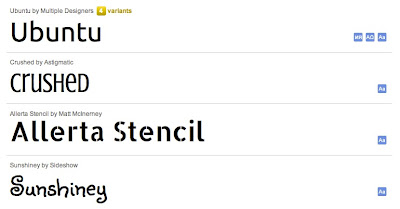
Some example web fonts, offered by the Google Web Fonts service
The adoption of the web font technology has been rapid. Google Web Fonts now serves roughly 50 million daily requests[1], across roughly 800,000 unique websites[2], and is growing at about 30% each month. Here at Google, we’re excited about the potential for web fonts to change the very fabric of the web. Beautiful typography makes the web more pleasant to browse, expressive, and interesting.
Here’s to a beautiful Web!
Written by David Wurtz, Product Manager, Google Web Fonts
[1] A request is a single call to the Google Font API for one or more fonts.
[2] We count a unique website as unique domains, except that “www” subdomains are not counted. For example, www.myblog.com and myblog.com would count as one domain. However, sam.myblog.com and sally.myblog.com would count as two domains.
-
-
04 Apr 11

-
01 Apr 11
-
30 Mar 11
-
15 Mar 11
 David Shatford
A very useful site; a blog with information from actual employees of Google providing the Google view of search engine optimization
-
26 Feb 11
-
13 Feb 11
-
17 Jan 11
-
31 Dec 10
-
20 Dec 10
-
15 Nov 10
-
07 Nov 10
-
19 Oct 10
-
06 Oct 10
-
05 Oct 10
-
30 Sep 10
-
29 Sep 10
-
23 Sep 10
-
03 Sep 10
-
25 Aug 10
-
20 Aug 10
-
15 Aug 10
-
06 Jul 10
-
28 Jun 10
-
22 Jun 10
-
21 Jun 10
-
16 Jun 10
-
15 Jun 10
-
11 Jun 10
-
05 Jun 10
-
07 May 10
-
14 Apr 10
-
12 Apr 10
-
10 Apr 10
-
09 Apr 10
-
06 Apr 10
-
30 Mar 10

-
14 Mar 10
-
05 Mar 10
-
01 Mar 10


Page Comments
Venham Conhecer a Nova Temporada da http://www.jogando.net/mu/ na versão Season6, com muitas Novidades, Eventos, Itens e Muito mais, para os jogadores do http://www.jogando.net/mu/
Super - 10.000x
Pvp 15.000x
Very Easy - 5.000x
Hard 100 x
Extreme 10x
Novo Sever: War 1000x e Phoenix Ep.3 3.000x (32k stats) Acumulativo
Algumas Novidades:
-> Castle Siege, agora o GM da guild vencedora ganha SET exclusivo.
-> Colete “Coins of Gold Fortune” e troque por itens no NPC Delgado.
-> Novo Duel Arena, o top 1 do ranking ganha 100 GOLDs.
-> Compre muitas armas com ZEN no evento Moss the Gambler.
-> Fique logado e ganhe golds, Free ganha 1 GOLD por minuto e VIP 2 GOLDs.
-> Novas invasões de DOURADOS.
-> Novo mapa Karutan com novos MOBs, drops exclusivos e muita XP.
-> Ganhe Chaos Castle e receba itens ancients.
-> Todo dia sorteio de GOLDs entre os players logado.
-> Dezenas de invasões todos os dias.
-> O TOP ranking da semanal e do mês ganha muitos GOLDs seja TOP você também.
-> Leo the Helper, ganhe todo dia um novo item clicando no NPC.
-> O player TOP 1 Semanal de Illusion temple ganha “Fenrir Gold”.
-> Seja um divulgador e ganhe set exclusivo de Divulgador.
-> MegaUltraSuperHiper Evento de Castle Siege
-> Novo char Range Fighter
-> Novos PVPs
-> Novos Mapas
-> Novos rankings será implantado
-> Nova skin no forum com novas opções.
-> Novas Asas, Ring e Pendats 5 Socket
-> Novos Kits Fusion V2, Shield Pv3, Kit Mysthical e ItensSupremo Diamond (raro) Apenas 100 será vendidos
-> Novos Sets especial com o melhor preço
By xXxEmOxXx
Would you like to comment?
Join Diigo for a free account, or sign in if you are already a member.