
This link has been bookmarked by 178 people . It was first bookmarked on 01 Dec 2008, by George Debreceni.
-
10 Dec 13
 gauramit87
Latency and bandwidth are independent. bandwidth is how much data you can transfer per second. on the other hand latency is how much time it will take to transfer that data from source to destination.
-
The first thing that jumps out is how absurdly fast our processors are. Most simple instructions on the Core 2 take one clock cycle to execute, hence a third of a nanosecond at 3.0Ghz.
-
it must read from and write to system memory, which it accesses via the L1 and L2 caches
-
code size.
-
One way in which instruction-level optimization is still very relevant is
-
Due to caching, there can be massive performance differences between code that fits wholly into the L1/L2 caches and code that needs to be marshalled into and out of the caches as it executes.
-
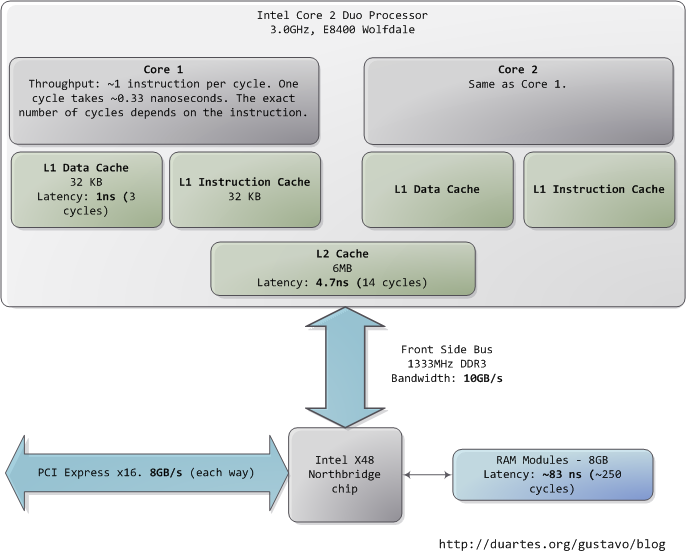
The exact latency of main memory is variable and depends on the application and many other factors. For example, it depends on the CAS latency and specifications of the actual RAM stick that is in the computer.
-
Now, the front side bus bandwidth, ~10GB/s, actually looks decent. At that rate, you could read all of 8GB of system memory in less than one second or read 100 bytes in 10ns.
-
-
13 Feb 13
-
19 Jun 12
-
19 Dec 11
-
19 Nov 11
-
27 Sep 11
-
29 Mar 11
 J M
J MThis post takes a look at the speed – latency and throughput – of various subsystems in a modern commodity PC, an Intel Core 2 Duo at 3.0GHz. I hope to give a feel for the relative speed of each component and a cheatsheet for back-of-the-envelope performance calculations. I’ve tried to show real-world throughputs (the sources are posted as a comment) rather than theoretical maximums. Time units are nanoseconds (ns, 10-9 seconds), milliseconds (ms, 10-3 seconds), and seconds (s). Throughput units are in megabytes and gigabytes per second. Let’s start with CPU and memory, the north of the northbridge:
-
09 Mar 11
-
12 Feb 11
-
14 Jan 11
-
11 Jan 11
-
09 Jan 11
-
04 Jan 11
-
28 Dec 10
-
10 Dec 10
-
21 Nov 10
-
13 Nov 10
-
10 Nov 10
-
09 Nov 10
-
16 Oct 10
-
15 Oct 10
-
09 Oct 10
-
Most simple instructions on the Core 2 take one clock cycle to execute, hence a third of a nanosecond at 3.0Ghz. For reference, light only travels ~4 inches (10 cm) in the time taken by a clock cycle. It’s worth keeping this in mind when you’re thinking of optimization - instructions are comically cheap to execute nowadays.
-
-
08 Oct 10
-
23 Jul 10
-
02 May 10
-
08 Mar 10
-
24 Dec 09
-
18 Dec 09
-
28 Oct 09
-
12 Oct 09
-
24 Aug 09
-
15 Jun 09
 Navneet Kumar
CPU - Cache - Memory - Disk
Performance Computer-Architecture Computing Hardware Windows CPU Memory Latency Intel Architecture
-
one clock cycle to execute, hence a third of a nanosecond at 3.0Ghz. For reference, light only travels ~4 inches (10 cm) in the time taken by a clock cycle.
-
To put this into perspective, reading from L1 cache is like grabbing a piece of paper from your desk (3 seconds), L2 cache is picking up a book from a nearby shelf (14 seconds), and main system memory is taking a 4-minute walk down the hall to buy a Twix bar
-
For a discussion of all things memory, see Ulrich Drepper’s What Every Programmer Should Know About Memory (pdf), a fine paper on the subject.
-
Keeping with the office analogy, waiting for a hard drive seek is like leaving the building to roam the earth for one year and three months.
-
Filesystem defragmentation aims to keep files in continuous chunks on the disk to minimize seeks and boost throughput.
-
-
05 Jun 09
-
15 Apr 09

-
19 Feb 09
-
11 Feb 09
-
05 Feb 09
-
14 Jan 09
-
08 Jan 09
-
19 Dec 08
-
14 Dec 08
-
08 Dec 08
-
06 Dec 08

-
05 Dec 08
-
04 Dec 08
-
03 Dec 08
-
 Chris King
good info on what your computer is doing while you're waiting
computers throughput system how_it_works interesting Delicious-12-16-10
-

-
02 Dec 08
-
 Vedran Krivokuca
This post takes a look at the speed - latency and throughput - of various subsystems in a modern commodity PC, an Intel Core 2 Duo at 3.0GHz. I hope to give a feel for the relative speed of each component and a cheatsheet for back-of-the-envelope performa
-
 Andrzej T
ive seek latency. In fact, while hard drives are 5 orders of magnitude removed from main memory, they’re in the same magnitude as the Internet. Residential bandwidth still lags behind that of sustained hard drive reads, but the ‘network is the computer’ i
-
-
-
The first thing that jumps out is how absurdly fast our processors are. Most simple instructions on the Core 2 take one clock cycle to execute, hence a third of a nanosecond at 3.0Ghz. For reference, light only travels ~4 inches (10 cm) in the time taken by a clock cycle. It’s worth keeping this in mind when you’re thinking of optimization - instructions are comically cheap to execute nowadays.
-
-
-
This post takes a look at the speed - latency and throughput - of various subsystems in a modern commodity PC, an Intel Core 2 Duo at 3.0GHz. I hope to give a feel for the relative speed of each component and a cheatsheet for back-of-the-envelope performance calculations. I’ve tried to show real-world throughputs (the sources are posted as a comment) rather than theoretical maximums. Time units are nanoseconds (ns, 10-9 seconds), milliseconds (ms, 10-3 seconds), and seconds (s). Throughput units are in megabytes and gigabytes per second. Let’s start with CPU and memory, the north of the northbridge:
-
-
01 Dec 08


Would you like to comment?
Join Diigo for a free account, or sign in if you are already a member.